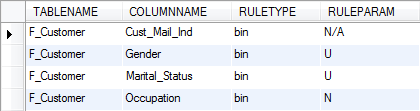
Cleansing actions allow you to automatically clean up some of your source data when building your SXV4 database.
Cleansing actions apply to columns that can only be one of a set of possible values. This includes:
-
Classified columns - columns in fact tables that should be one of a set of possible values defined in a linked classification table.
-
Foreign key columns - columns in fact tables that should be one of a set of possible values defined in another fact table.
For example, the Gender column might be linked to a classification table containing the codes M (Male), F (Female), and U (Unknown). What should SuperCHANNEL do if it encounters an empty value for this column in one of the records in the fact table?
By specifying a cleansing action, you control what SuperCHANNEL should do when it encounters a value that does not match one of the possible values.
The SuperCHANNEL GUI does not read the CLEANSING_RULES table; columns will be set to use the default cleansing action (unless they are specified in the BINS registry table). You will need to set the cleansing actions in the GUI when designing your target database.
Table Definition
|
Column Name |
Data Type |
Size |
Primary Key |
Specifies... |
|---|---|---|---|---|
|
TABLENAME |
string |
128 |
YES |
The table this rule applies to. |
|
COLUMNNAME |
string |
128 |
YES |
The column in that table that this rule applies to. |
|
RULETYPE |
string |
128 |
|
The cleansing action, which can be one of the following (see below for an explanation of what these actions mean):
|
|
RULEPARAM |
string |
128 |
|
If the bin rule is used, the value to convert/bin to. It is also possible to set bin rules in the BINS registry table. Any rules defined in the BINS table take precedence over the rules defined in the CLEANSING_RULES table. |
Cleansing Actions
The available cleansing actions are:
|
Cleansing Action |
Description |
|---|---|
|
Add To Classification |
Add the new value to the classification table. This is the default action for classified columns. This option is only available for classified columns; it cannot be used for foreign key columns to other fact tables or between a fact table column and a multi-response fact table. If you try to set these to use the add to classification action then SuperCHANNEL will automatically revert to skip. |
|
Bin |
Convert the value to a specified "bin" value. The bin value must already exist in the corresponding classification table. |
|
None |
Do not capture exceptions. Use this action for non-SXV4 drivers. |
|
Skip Row |
Skip this record. This can be a useful cleansing action for a column linking two fact tables. For example if you want SuperCHANNEL to skip all Account records that do not have associated Customer records. Use caution when selecting this option: your target may end up with fewer fact records than the source. |
|
Stop |
Stop the build process. This is the default action for foreign key columns to other fact tables. |
Example