
This section contains a reference guide to the tables required in your external metadata database. Most of these tables will be created automatically when you run BuildMetadataTemplate.bat during the set up process.
However, you may subsequently need to manually create additional tables and columns. For example, if you want to add translations for a new SuperSTAR dataset or add a new language translation without recreating the entire metadata database.
The following diagram shows the different tables that make up the metadata databases, and how they are connected to each other:
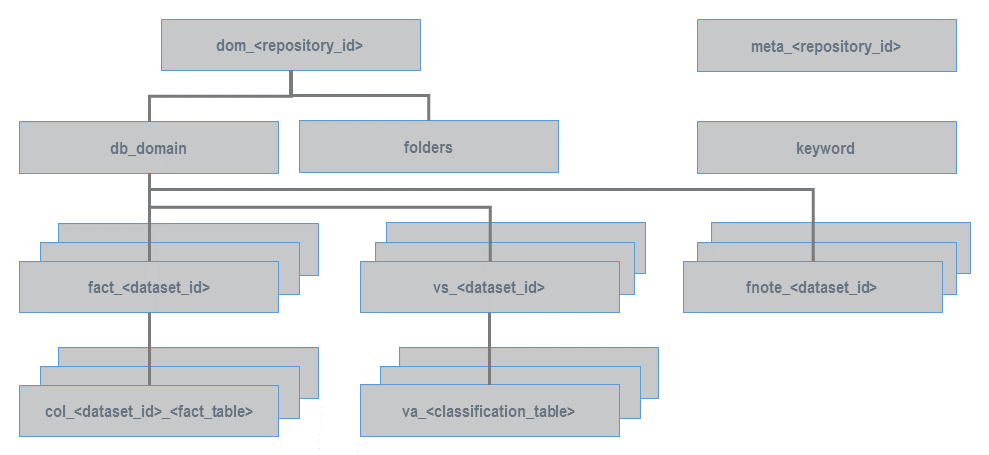
See below for more details about each table:
You will need to manually create the keyword and folders tables.
Overview: Populating Names and Descriptions
Following is a quick reference guide to where to populate the different translations and descriptions in the metadata database.
|
Item |
Location |
Example |
|---|---|---|
|
Dataset |
|

|
|
Field |
|

|
|
Summation Option (Measure) |
|

|
|
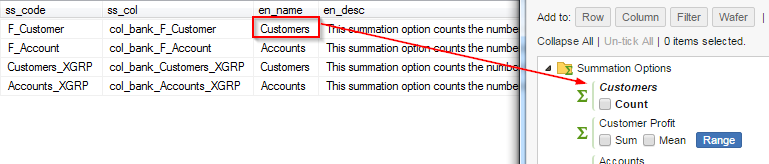
Summation Option (Fact Table Count) |
|
|
|
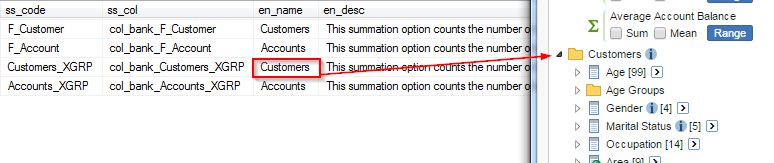
Field Group |
|
|
|
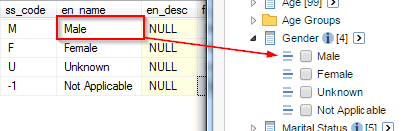
Field Value |
|
|
|
Name of value set in the Select all at level drop-down list |
|
|
|
Annotation |
|
|
col_<dataset_id>_<fact_table>
The metadata database must contain one of these tables for every fact table in every SXV4).
This table stores the translations and descriptions for all the fields in the dataset.
-
<dataset_id>must match the ID set in SuperADMIN. -
<fact_table>must match the original name of the fact table from the SXV4 (BuildMetadataTemplate.bat automatically extracts the name of the fact table from the SXV4).
It contains the following columns:
|
|
Contains the original code of the fact table column from the SXV4. For example, for the F_Account fact table in Retail Banking this column contains values such as:
|
|---|---|
|
|
The translated name of this fact table column. For example:
|
|
|
A translated description of the column. |
db_domain
The metadata database must contain one db_domain table.
It contains details of the SXV4s:
|
|
The |
|---|---|
|
|
The name of the table in the metadata database that contains the list of fact tables for this SXV4. The referenced table will be named |
|
|
The name of the table in the metadata database that contains translations for the annotations (footnotes) for this SXV4. The referenced table will be named |
|
|
The name of the table in the metadata database that contains the translations for the value set labels for this SXV4. The referenced table will be named |
|
|
The translated name of the SXV4. |
|
|
A description of the SXV4. This can be displayed in SuperWEB2 on the Datasets page. |
dom_<repository_id>
The metadata database must contain one dom_<repository_id> table. It is the master table in the metadata database; it contains a single record that tells Metadata Server the name of the db_domain table and your folders table:
|
|
This must be set to |
|---|---|
|
|
The name of the |
|
|
The name of the table that contains translations for your folder names. |
|
|
There will also be one |
|
|
There will also be one |
fact_<dataset_id>
The metadata database must contain one of these tables for every SXV4.
It contains details of the fact tables and field groups:
|
|
The original name of the fact table or field group in the SXV4. For example: |
|---|---|
|
|
The name of the table in the metadata database that contains the translations and descriptions for the fact table's columns. The referenced table will be named |
|
|
The translated name of the fact table or field group. In the case of fact tables, this name will be used for the count summation option for this fact table. |
|
|
A description of the fact table or field group. In the case of fact tables, the description will be used as metadata for the count summation option for this fact table. |
fnote_<dataset_id>
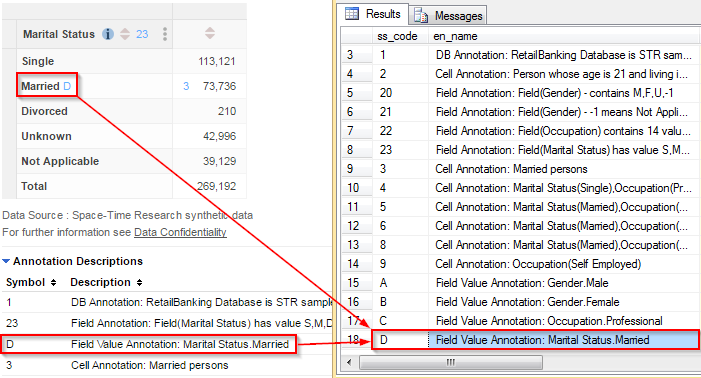
The metadata database must contain one of these tables for every SXV4 that has annotations. It contains translations for the annotations:
|
|
The annotation symbol that is displayed in the table (this is the value in the |
|---|---|
|
|
The translation of the annotation text. |
folders
If you want to translate the names of SuperADMIN folders then you will need to create a folders table containing the translations.
You can call this table whatever name you like (as long as it is not the same as one of the other standard table names). Once you have created the folders table you must insert the folder name into the ss_fldr column in the dom_<repository_id> table.
Your folders table needs to contain the following columns:
|
|
The ID of the folder (defined in SuperADMIN). |
|---|---|
|
|
The translated name of the folder. |
Each folder has its own multilingual property in SuperADMIN. You must set this to true in addition to setting it for individual datasets if you want the folders to pick up the translations.
keyword
The keyword table is not created by default when you run BuildMetadataTemplate.bat.
You need to create a table in your metadata database called keyword and populate it with the translations for various keywords used in SuperCROSS and SuperWEB2, such as "and", "by", "count", "mean" and "median".
The keyword table must have the following columns:
|
|
Contains the untranslated keyword codes. |
|---|---|
|
|
The translation of the keyword in this language. You need to create one |
For example, if you are supporting English, French and German, your keyword table would need four columns: ss_code (keyword codes), en_name (English translations), fr_name (French translations), and de_name (German translations).
The columns should be set to a varchar type that is long enough to accommodate the longest keyword translation in that language.
The keywords you need to translate are as follows (the values in the ss_code column must exactly match the ones shown here):
|
|
|
Used... |
|---|---|---|
|
allfunctions |
All |
In the Select all at level option for Summation Options. |
|
allcounts |
Counts |
In the Select all at level option for Summation Options. |
|
allsums |
Sums |
In the Select all at level option for Summation Options. |
|
allmeans |
Means |
In the Select all at level option for Summation Options. |
|
and |
and |
In table names and axis labels. For example: Gender and Marital Status by Age. |
|
by |
by |
In table names. For example: Gender by Age. |
|
count |
Count |
In the tree for the count summation. |
|
counting |
Counting |
In titles in SuperWEB2 Graph View, as well as in table downloads. |
|
countof |
{0} |
As a translation of "count of". Not required as this is the default summation, but can be added if required for languages other than English. If you include |
|
dataSource |
Data Source |
In the data source footnote at the bottom of the table in Table View. |
|
defaultSummation |
Default Summation |
To identify the default summation in the current table. |
|
description |
Description |
In the header row of the table listing annotation symbols and descriptions for the current cross tabulation table. |
|
filters |
Filters |
In titles in SuperWEB2 Graph View. |
|
for |
for |
In titles in SuperWEB2 Graph View. |
|
mean |
Mean |
In the summation options. |
|
meanof |
Mean of {0} |
When the summation option appears in the table. For example: Mean of Customer Profit. If you include |
|
median |
Median |
In the summation options. |
|
medianof |
Median of {0} |
When the summation option appears in the table. For example: Median of Customer Profit. If you include |
|
organisation_name |
|
When the organisation name is displayed in table headers and footers. |
|
percentile |
Percentile |
In the summation options. |
|
percentileof |
Percentile of {0} |
When the summation option appears in the table. For example: Percentile of Customer Profit. If you include |
|
ranges |
Ranges |
To identify the list of currently defined ranges in the field tree. |
|
recode_total |
Total |
In place of the total keyword when the table contains recodes. |
|
sdmx-codelist-aggregationLevel |
Aggregation Level |
In labels used in SDMX downloads. See Branding SDMX Downloads for more details. |
|
sdmx-codelist-concept-measureDimension |
Measure dimension variables |
In labels used in SDMX downloads. See Branding SDMX Downloads for more details. |
|
sdmx-codelist-measure |
Measures |
In labels used in SDMX downloads. See Branding SDMX Downloads for more details. |
|
sdmx-codelist-measureType |
Measure Type |
In labels used in SDMX downloads. See Branding SDMX Downloads for more details. |
|
sdmx-codelist-measureType-count |
Count |
In labels used in SDMX downloads. See Branding SDMX Downloads for more details. |
|
sdmx-codelist-measureType-mean |
Mean |
In labels used in SDMX downloads. See Branding SDMX Downloads for more details. |
|
sdmx-codelist-measureType-median |
Median |
In labels used in SDMX downloads. See Branding SDMX Downloads for more details. |
|
sdmx-codelist-measureType-sum |
Sum |
In labels used in SDMX downloads. See Branding SDMX Downloads for more details. |
|
sdmx-codelist-unitMeasure |
Unit of Measure |
In labels used in SDMX downloads. See Branding SDMX Downloads for more details. |
|
sdmx-codelist-unitMeasure-number |
Number |
In labels used in SDMX downloads. See Branding SDMX Downloads for more details. |
|
sdmx-concept-aggregationLevel |
Record type used for aggregation |
In labels used in SDMX downloads. See Branding SDMX Downloads for more details. |
|
sdmx-concept-measureType |
Method used to aggregate measures |
In labels used in SDMX downloads. See Branding SDMX Downloads for more details. |
|
sdmx-concept-observationValue |
Observation value |
In labels used in SDMX downloads. See Branding SDMX Downloads for more details. |
|
sdmx-concept-observationValue-desc |
The value, at a particular period, of a particular variable. |
In labels used in SDMX downloads. See Branding SDMX Downloads for more details. |
|
sdmx-concept-time |
Time |
In labels used in SDMX downloads. See Branding SDMX Downloads for more details. |
|
sdmx-concept-unitMeasure |
Unit in which the data values are measured |
In labels used in SDMX downloads. See Branding SDMX Downloads for more details. |
|
sdmx-concept-unitMultiplier |
Exponent in base 10 ..... |
In labels used in SDMX downloads. See Branding SDMX Downloads for more details. |
|
sdmx-rse-description |
SDMX relative standard error description |
In labels used in SDMX downloads. See Branding SDMX Downloads for more details. |
|
sdmx-rse-name |
Relative standard error |
In labels used in SDMX downloads. See Branding SDMX Downloads for more details. |
|
sdmx-scaleDescriptions |
Unit Multiplier |
In labels used in SDMX downloads. See Branding SDMX Downloads for more details. |
|
sdmx-scaleDescriptions-0 |
Units |
In labels used in SDMX downloads. See Branding SDMX Downloads for more details. |
|
sdmx-scaleDescriptions-1 |
Tens |
In labels used in SDMX downloads. See Branding SDMX Downloads for more details. |
|
sdmx-scaleDescriptions-2 |
Hundreds |
In labels used in SDMX downloads. See Branding SDMX Downloads for more details. |
|
sdmx-scaleDescriptions-3 |
Thousands |
In labels used in SDMX downloads. See Branding SDMX Downloads for more details. |
|
sdmx-scaleDescriptions-default |
10^%1$d Units |
In labels used in SDMX downloads. See Branding SDMX Downloads for more details. |
|
selectsummationfunctions |
Select Summation Functions |
In the Select all at level option for Summation Options. |
|
sum |
Sum |
In the summation options. |
|
summationOptions |
Summation Options |
As the title for the summation options in the customise table panel. |
|
sumof |
{0} |
As a translation of "sum of" when the summation option appears in the table. Not required as this is the default summation, but can be added if required for languages other than English. If you include |
|
symbol |
Symbol |
In the header row of the table listing annotation symbols and descriptions for the current cross tabulation table. |
|
then |
then |
In table titles, when listing items concatenated on an axis. |
|
total |
Total |
In tables when a row/column/wafer total is included. |
|
udf-quantile-range |
Values from {Min} to {Max} make up Quantile Range {Num} |
In labels for custom quantiles. See Configure Quantiles and Ranges for more details. |
|
udf-range-exclusive-first |
Less than {Max} |
In labels for custom ranges. See Configure Quantiles and Ranges for more details. |
|
udf-range-exclusive-last |
{Min} or more |
In labels for custom ranges. See Configure Quantiles and Ranges for more details. |
|
udf-range-exclusive-range |
{Min} to less than {Max} |
In labels for custom ranges. See Configure Quantiles and Ranges for more details. |
|
udf-range-inclusive-first |
{Max} or less |
In labels for custom ranges. See Configure Quantiles and Ranges for more details. |
|
udf-range-inclusive-last |
More than {Min} |
In labels for custom ranges. See Configure Quantiles and Ranges for more details. |
|
udf-range-inclusive-range |
More than {Min} to {Max} |
In labels for custom ranges. See Configure Quantiles and Ranges for more details. |
|
wafers |
Wafers |
To identify the list of wafers in the current table. |
|
weightedcount |
Weighted Count of {0} |
When a weighted summation option appears in the table. For example: Weighted Count of Customer Profit. If you include |
|
weightedmean |
Weighted Mean of {0} |
When a weighted summation option appears in the table. For example: Weighted Mean of Customer Profit. If you include |
|
weightedmedian |
Weighted Median of {0} |
When a weighted summation option appears in the table. For example: Weighted Median of Customer Profit. If you include |
|
weightedpercentile |
{0} |
Not currently used. |
|
weightedsum |
Weighted Sum of {0} |
When a weighted summation option appears in the table. For example: Weighted Sum of Customer Profit. If you include |
The keyword table takes precedence over any keywords defined in the SuperWEB2 database_labels.properties files. If a keyword is defined in both places, then the value from the Metadata database will be used. If the keyword is not defined in the metadata database then SuperWEB2 will fall back to the value in the properties file.
meta_<repository_id>
The metadata database must contain one meta_<repository_id> table. The <repository_id> is the ID you set in BuildMetadataTemplate.bat when you created the initial metadata database. This is also the ID that needs to be specified in the connection string in metadata.config.xml.
This table contains the details of the columns created in each metadata database table (the columns you specified in metacolumns.txt when you ran BuildMetadataTemplate.bat):
|
|
The column name. For example: |
|---|---|
|
|
The language code denoting the language that this column contains. For example: |
|
|
The column type:
|
|
|
The column size in characters. |
va_<classification_table>
The metadata database must contain one va_<classification_table> for every classification table in the SXV4 database(s).
<classification_table> must match the original name of the classification table from the SXV4 (BuildMetadataTemplate.bat automatically extracts the name of the classification table from the SXV4).
It contains the following columns:
|
|
Contains the original code of the classification table column from the SXV4. For example, the C_Gender classification table in sample Retail Banking contains the codes M, F, U and -1. |
|---|---|
|
|
The translated name of this column. For example: "Male", "Female", "Unknown", "Not Applicable" |
|
|
A translated description of the column. |
vs_<dataset_id>
The metadata database must contain one vs_<dataset_id> table for every SXV4. This table contains translations for value set labels.
It contains the following columns:
|
|
The code for this value set from the SXV4. |
|---|---|
|
|
The name of the table in the metadata database that contains the translations for the classification table this value set belongs to. |
|
|
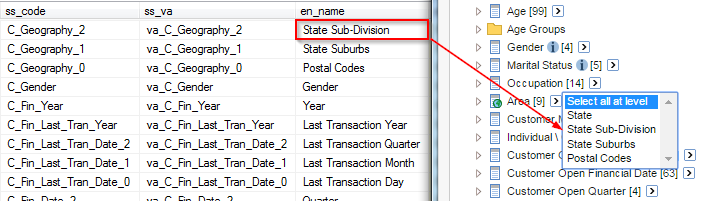
The translated name of this value set. Value set labels are used in SuperWEB2: they appear in the Select all at level drop-down lists, and are also displayed in table titles and row/column/wafer/filter headings. If you do not provide a translation for a given value set, then:
|
|
|
Not used. |