
The reporting thresholds module allows you to suppress cell output in cases where the response rate falls below your configured threshold. For example, you might have an optional field in your data and want to suppress output in cases where less than 70% of respondents have provided an answer for that field.
This module is not a statistical disclosure control feature. It is purely intended to avoid displaying misleading results.
In some cases, users may be able to infer the value of a cell that has been suppressed by this module, based on other cell values (such as the total).
When the reporting threshold module is enabled, cell values will be suppressed if the response rate is below the configured threshold. Suppressed cells will be replaced with the concealment string (the value of concealedString configured in CubeCatalog.xml) and the concealedStringDescription will be displayed below the table.
You can optionally display an additional custom annotation below the table. This is configured in the reporting threshold settings:
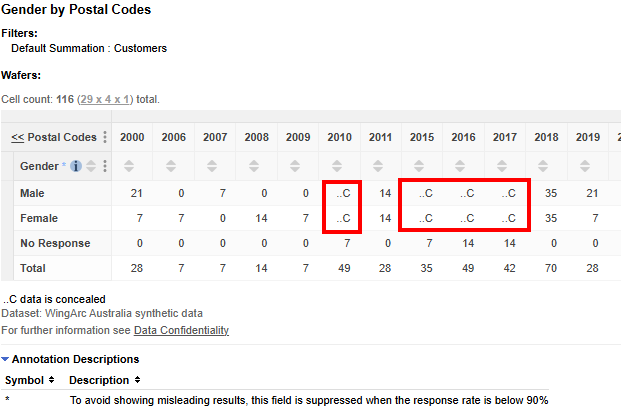
By default, the non-response value and the total are still shown (as in the above screenshot) but you can use the optional mode setting described below to also conceal those values if required.
Restrictions and Limitations
There are a few limitations and restrictions to note regarding the reporting thresholds module:
-
Reporting thresholds is primarily designed to work with SuperWEB2. The suppression is applied at SuperSERVER-level, so it will work with other clients, such as SuperCROSS, but in order to use it with SuperCROSS, you must take care when constructing your table. In order to work out the threshold, the module requires the entire field with all its field items to be in the table, plus a total.
In SuperWEB2 we recommend using the Mandatory Values feature to ensure that all items for a field with thresholds are always in the table whenever anything from that field is in the table.
SuperCROSS does not have an equivalent rule, so you will need to manually ensure that you always add the whole field. In addition, you will need to ensure that you have added totals (for example by selecting the Add Total With Default Recodes option in the SuperCROSS Fields list before adding the field to your table). You will be blocked from processing any table that does not contain a total on the field that has thresholds applied to it. -
The reporting thresholds module does not support tables where the field that is configured to apply a threshold is concatenated with another field (i.e., the fields are listed one after the other in same axis in the table).
The thresholds module requires the field total in order to calculate the threshold, and concatenations do not support totals. Users will be blocked from processing any table where the threshold field is used in a concatenation.
-
We do not recommend configuring the reporting thresholds module to apply to hierarchical fields. The module does not currently support selecting an individual level in a hierarchy to apply the rule to, so can only work with hierarchies by applying to all the levels. It would also only work for a hierarchy if there is a non-response item on every level of the hierarchy that has the same code.
-
The thresholds module will not adjust any cell value that is already 0. These cells will remain as a 0 in the table, rather than being replaced with the value of
concealedString.
Module Properties
The reporting thresholds module has the following properties:
|
Property |
Description |
|---|---|
|
|
The field or fields that the threshold rule applies to. To apply rules for multiple fields, specify the fields as a list separated by semi-colons. You can specify fields either using the original displayname defined in the SXV4 or the field’s ID in the format
|
|
|
The threshold value for the specified field, expressed as a decimal. For example if you want to suppress when the response rate is under 70%, set the threshold to |
|
|
The code of the field item that represents a non-response. |
|
|
(Optional). The suppression mode to use:
If you do not specify the mode then mode 0 is used by default. |
|
|
(Optional). An annotation symbol to be displayed against the field when it appears in a table. |
|
|
(Optional). An annotation description to be displayed when the field appears in a table. |
Configuration Example
To configure reporting thresholds:
-
For each field where you want to use a threshold, you should first configure Mandatory Values so that all the items from that field are required if any of that field’s items are in a table. For example, if you want to use a threshold on the field “Gender”, which has values “Male”, “Female”, “Unknown” and “Not Applicable”, configure Mandatory Values for all four field items. This step is required because the suppression module relies on calculating percentages, and these can only be accurately calculated if the entire field is in the table.
If you are using the Open Data API, then make sure you also enable the Mandatory Values rule for the API. The API has its own copy of RulesEngine.xml located in <tomcat_home>\webapps\webapi#rest#v1\WEB-INF\data\.repository and you will need to uncomment the rule here in theOpenDataApiRulessection to ensure that the rule also applies to API queries. -
Login to SuperADMIN and create a new method using the following command:
method addmethod <method_id>For example:
method addmethod thresholds -
Add the data control plugin
ReportingThresholdsto your method using the following command:method <method_id> adddcplugin <plugin_id> ReportingThresholdsFor example:
method thresholds adddcplugin thresholdrules ReportingThresholds -
Set the properties using the following commands (the annotation properties are optional):
method <method_id> <plugin_id> addproperty field <field>
method <method_id> <plugin_id> addproperty <field>.threshold <value>
method <method_id> <plugin_id> addproperty <field>.notStatedValue <value>
method <method_id> <plugin_id> addproperty <field>.mode <value>
method <method_id> <plugin_id> addproperty <field>.annotationSymbol <value>
method <method_id> <plugin_id> addproperty <field>.annotation <value>
For example:
method thresholds thresholdrules addproperty field "Gender"
method thresholds thresholdrules addproperty "Gender.threshold" "0.9"
method thresholds thresholdrules addproperty "Gender.notStatedValue" "U"
method thresholds thresholdrules addproperty "Gender.mode" "2"
method thresholds thresholdrules addproperty "Gender.annotationSymbol" "*"
method thresholds thresholdrules addproperty "Gender.annotation" "To avoid showing misleading results, this field is suppressed when the response rate is below 90%"
If you want to apply thresholds for multiple fields, specify a list of fields in the
fieldproperty, separated by semi-colons. For example:method thresholds thresholdrules addproperty field "Gender;Marital Status" method thresholds thresholdrules addproperty "Gender.threshold" "0.9" method thresholds thresholdrules addproperty "Gender.notStatedValue" "U" method thresholds thresholdrules addproperty "Gender.mode" "2" method thresholds thresholdrules addproperty "Gender.annotationSymbol" "*" method thresholds thresholdrules addproperty "Gender.annotation" "To avoid showing misleading results, this field is suppressed when the response rate is below 90%" method thresholds thresholdrules addproperty "Marital Status.threshold" "0.8" method thresholds thresholdrules addproperty "Marital Status.notStatedValue" "U" -
Once you have finished configuring your method, use the following command to apply it to the relevant datasets:
cat <dataset_id> addmethod <method_id>For example:
cat bank addmethod thresholds
Data Control Module Priority
If you are using other data control modules, in addition to reporting thresholds, you should take care to ensure that the modules run in your preferred order. For example, if you are using perturbation, you most likely want the reporting thresholds module to run first, on the unperturbed results, with perturbation running after the thresholds module.
All data control modules have a priority value, which is defined as an integer. Modules with a lower priority value run first.
One way to set the priority is to add the modules to the dataset in the order you want them to run. When you run the command cat <dataset_id> addmethod <method_id> without specifying a priority, each method is automatically assigned the next highest priority, so the one you added first will run first.
Alternatively, if you have already added the modules to the dataset, you can use the following commands to check and set the priority:
cat <dataset_id> methods
For example:
> cat bank methods
[ Methods ]
    [ Method id: perturbation   priority: 1 ]
    [ Method id: thresholds   priority: 2 ]
In this example, perturbation has been configured to run first, followed by thresholds. To change the priority order, use the following command:
cat <dataset_id> methods <method_id> priority <value>
For example:
> cat bank methods thresholds priority 1

> cat bank methods
[ Methods ]
    [ Method id: thresholds   priority: 1 ]
    [ Method id: perturbation   priority: 2 ]