
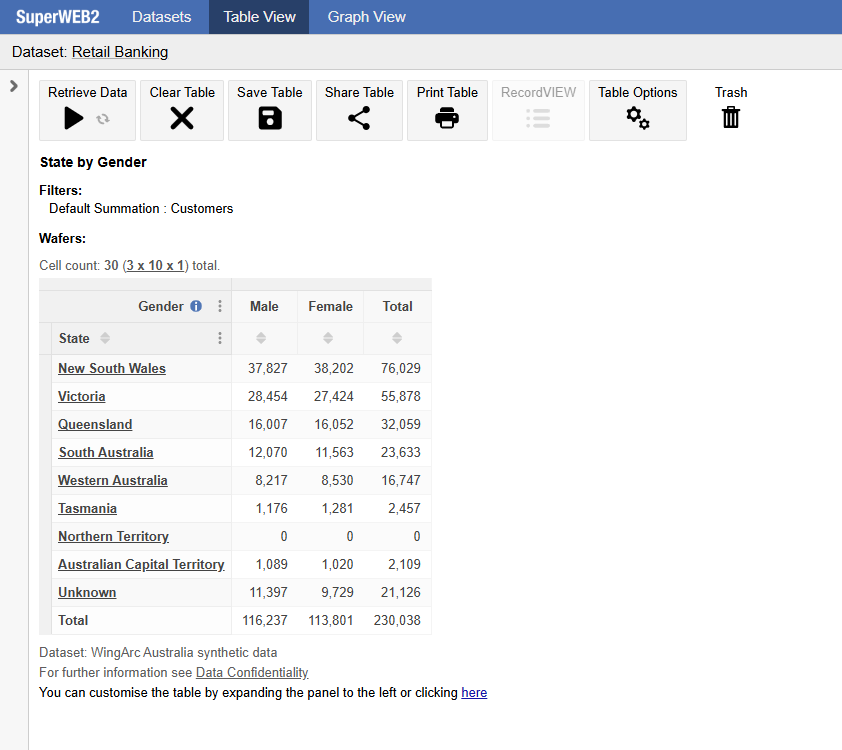
By default, when users open a saved table from the catalogue, SuperWEB2 opens the table in Table View with the Customise Table panel (field tree) hidden:
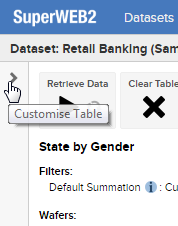
If users want to edit the table, they need to expand the Customise Table panel by clicking the arrow:
If you prefer, you can configure SuperWEB2 to display the Customise Table panel by default, even when users open a saved table.
To make this change you need to edit <tomcat_home>\webapps\webapi\WEB-INF\faces-config.xml
-
Open this file in a text editor.
Make a backup copy of this file before making any changes.
-
Locate the following section:
XML<navigation-case> <from-outcome>loadTableSuccess</from-outcome> <to-view-id>/tableView/tableView.xhtml</to-view-id> <redirect/> </navigation-case> -
Change the
<to-view-id>setting to/tableView/customiseTable.xhtmlXML<navigation-case> <from-outcome>loadTableSuccess</from-outcome> <to-view-id>/tableView/customiseTable.xhtml</to-view-id> <redirect/> </navigation-case> -
Save your changes and restart Tomcat or the SuperWEB2 service.
Direct URL Behaviour
The above steps control the behaviour of the Customise Table panel for saved tables opened within an existing SuperWEB2 session (i.e., when a user who is already actively using the tool clicks to open one of the saved tables).
When users open a table via a direct URL, the Customise Table panel is also collapsed by default. If you want to change the behaviour for direct URL access then you can do so by changing the value of schemaTree.showOnDirectUrl in the configuration.properties file.
-
Open <tomcat_home>\webapps\webapi\WEB-INF\classes\configuration.properties in a text editor.
-
Locate the following section:
schemaTree.showOnDirectUrl= -
Set the value to
true:schemaTree.showOnDirectUrl=true -
Save your changes and restart Tomcat or the SuperWEB2 service.