
You can modify the table header and footer:
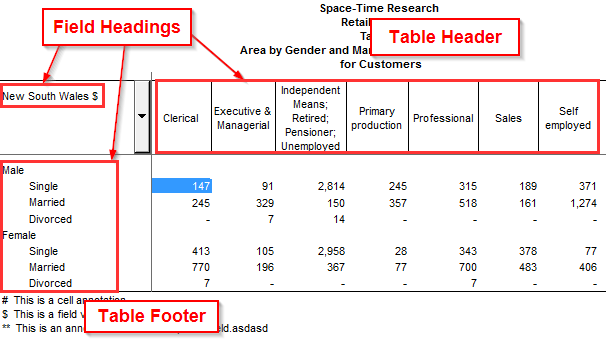
To edit the header, footer, or a field heading:
-
Double-click the item.
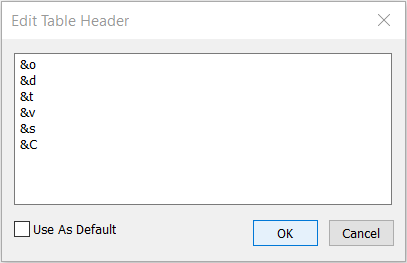
The Edit Table Header / Edit Heading / Edit Table Footer dialog displays.
-
Make your changes and click OK.
The header and footer can have a maximum of 244 characters. You can use the following special codes to display dynamic information about the table:
|
Code |
Represents |
|---|---|
|
&a |
The cell/field/field value annotations. |
|
&c |
The derivation's footnotes. |
|
&C |
The table cell count. |
|
&d |
The database name. |
|
&e |
The standard annotation table footnotes. See Weighted Datasets for more information. |
|
&f |
The total set of table footnotes defined in the database for this table. |
|
&n |
A newline. |
|
&o |
The organisation name (as defined in SuperCROSS under Edit > Options > General). |
|
&p |
Details of any columns that have custom power of ten settings applied. |
|
&r |
A description of the randomisation applied (for example using a data control plugin). For example "Confidentially rules have been applied to all cells in this table, including randomly rounding to base 3". |
|
&s |
The summation option in use. |
|
&t |
The filename of the table file. |
|
&v |
The details of the fields in use in the table (for example "Martial Status by Occupation"). |
|
&x |
The table method annotation (if the administrator has configured this). See Confidentiality for more information. |
|
&z |
The database annotations. |