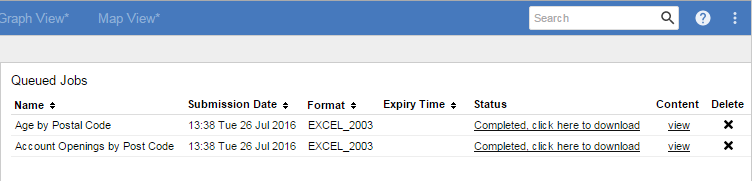
By default, the dates in the queue are displayed in the format dd/MM/yyyy '@' h:mm a (e.g. 05/09/2014 @ 3:25 PM).
If you want to use a different date format, you can change this by editing the common_labels.properties files, located in <tomcat_home>\webapps\webapi\WEB-INF\classes
There may be multiple copies of this file for different languages and locales, with names like common_labels_en.properties and common_labels_de.properties. Each one contains the text used for different languages. Depending on which languages are in use on your deployment, you may need to make these changes in all versions of this file. The properties file that is used will depend on the language settings in the end user's web browser, the set of supported locales defined in the faces-config.xml configuration file, and the language selected by the user from the drop-down list. See Multilingual and Localisation Support for more information about localisation and how SuperWEB2 uses the properties files.
-
Open the common_labels.properties file in a text editor.
Make a backup copy of this file before making any changes.
-
Locate the following line:
XMLtableView.downloadTable.recordList.dateFormat=dd/MM/yyyy '@' h:mm a -
Change the value to the pattern of your preferred date format. See the Java documentation for more details about the acceptable date formats.
For example:
XMLtableView.downloadTable.recordList.dateFormat=HH:mm E d MMM yyyy -
Save your changes.
Once you have completed the change for all locales, restart the SuperWEB2 Tomcat service to see the changes in the client.