
The following commands set global properties:
Concurrent User Limits
|
Description |
Set the maximum number of users from a particular group that can be logged in to SuperWEB2 at any one time. |
|---|---|
|
Usage |
View the current configuration: Update the configuration: Clear the configuration:
|
|
Examples |
The following commands allow a maximum of 50 users from the Guests group to be logged in at any one time:
|
|
More Information |
Configure Concurrent User Limits |
Field Exclusion Rules
|
Description |
Define a global field exclusion rule. |
|---|---|
|
Usage |
View the current configuration: Update the configuration: Clear the configuration:
|
|
Example |
The following commands specify that only one of Age, Area and Occupation can be added to a table at any one time:
|
|
More Information |
Field Exclusion Rules |
Large Table Mode
|
Description |
Override global large table mode settings. |
|---|---|
|
Usage |
View the current configuration: Update the configuration: Clear the configuration:
|
|
Examples |
The following examples set the row threshold to 500 for all users, and set the total threshold to 10,000 for all users except those in the administrators and internalusers groups.
|
|
More Information |
Configure Settings for Large Tables |
Maximum Selected Nodes
|
Description |
The maximum number of items that can be selected in the field tree in the customise table panel at any one time. This setting applies to both classifications and measures/summation options. The default setting for this property is -1, which means there is no limit. |
|---|---|
|
Usage |
View the current configuration: Update the configuration: Reset the configuration to the default:
|
|
Example |
The following command restricts the maximum number of selected nodes to 3:
|
This setting only applies when adding items to a table using the "Add to: Row/Column/Wafer" buttons:
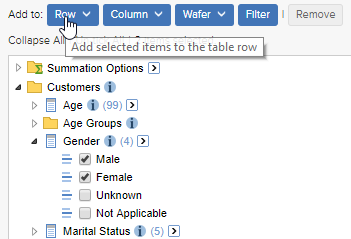
It does not apply when adding items to a table using the click and drag method:
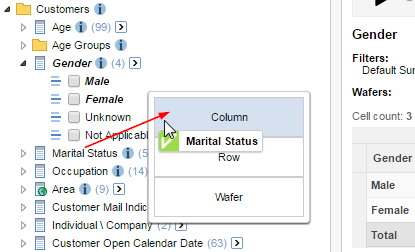
Query Limits
|
Description |
Set limits on the size of tables that users can create. You can restrict the number of fields, rows, columns, wafers, or total cells that users can add to a table. |
|---|---|
|
Usage |
View the current configuration: Update the default query limit configuration: Update the group query limit configuration: Clear the configuration:
|
|
Examples |
|
|
More Information |
Configure User Query Limits |
Saved Table Limits
|
Description |
Set limits on the number of tables that users can save. |
|---|---|
|
Usage |
View the current configuration: Update the configuration: Clear the configuration:
|
|
Examples |
|
|
More Information |
Saved Table Limits |
Value Set Drop-Down Labels
|
Description |
Set the drop-down label text for this value set. |
|---|---|
|
Usage |
View the current configuration: Update the configuration: Clear the configuration. You can either clear the labels for individual value sets or clear all the value set labels:
|
|
Examples |
The following command sets the label for the valuseset C_Age: The following command removes the drop-down label text defined for C_Age. SuperWEB2 will display the label that was defined in SuperCHANNEL when the SXV4 was created.
|
|
More Information |
Configure Field Drop-down Labels |