
A comparison field compares two existing fields. It creates three field values:
-
Field A is less than Field B
-
Field A is equal to Field B
-
Field A is greater than Field B
The fields being compared must be at the same hierarchical level.
For example, if you create a comparison between Account Profit and Average Account Balance the UDF will provide the following values:
-
Account Profit is less than Average Account Balance
-
Account Profit is equal to Average Account Balance
-
Account Profit is greater than Average Account Balance
To create a comparison field:
-
Select Cross > Define Field. The Define Fields window displays.
-
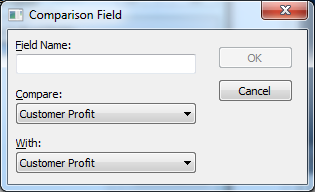
Click Comparison. The Comparison Field window displays.
-
Enter the following details:
Field
Description
Field Name
Enter a name for the field.
Compare
Select the first field for the comparison.
With
Select the second field for the comparison.
-
Click OK.