
This page describes major changes to the SuperSTAR suite from version 9.0 onwards. This is intended to assist customers who are upgrading to the latest version of the SuperSTAR suite.
Version 9.20
Initial Release: January 2026
|
Product |
Area |
Description |
More Information |
|---|---|---|---|
|
SuperADMIN |
Configuration Server Defaults |
The default configuration settings included with an initial “out of the box” deployment of SuperADMIN have been tidied up. Previously, the defaults contained some test data as well as mapping layers that referenced WingArc mapping servers. The default configuration is now limited to:
This change will not affect upgrades from previous releases, where you import your existing SuperADMIN data during the upgrade process. |
|
|
SuperADMIN |
Folder Structure |
The This change will not affect upgrades from previous releases, where you import your existing SuperADMIN data during the upgrade process. If you still have the One of the reasons for the removal of the There are other changes in this release related to the save tables feature; users can now overwrite existing tables in any shared folder where they have write permissions (including tables that were created by other users). It has always been the case that you should be careful when allocating write permissions (as they allow users to create tables that can be seen by any other user with read access to that folder, as well allowing users to delete tables in shared folders, including tables created by other users). With the recent changes it is even more important to review your permission settings and ensure that you only provide write permissions on shared folders to a limited set of trusted users. |
|
|
SuperADMIN |
Help |
The Previously, some of the commands used an inconsistent format ( |
|
|
SuperADMIN |
Import Limits |
Due to the third-party dependency updates in this release the akka library has been replaced with pekko. As a result, the configuration for increasing the file import limits for use with the cfg command has changed. See Export and Import Configuration - cfg for details. |
|
|
SuperADMIN |
Table Management |
A new command: This can be useful in situations where an end user has retired or left their organisation and the organisation wants to move that user's saved tables to their replacement. Additional logging has been added to the SuperWEB2 audit logs to indicate when tables have been transferred between users via this command. |
|
|
SuperCROSS |
Initial State |
SuperCROSS no longer automatically maximises itself on opening. It now opens as a normal window. |
|
|
SuperSERVER |
Data Control |
A new data control plugin is available for applying reporting thresholds. This can be used when you want to suppress cell output in cases where you have optional fields and the response rate falls below the threshold for meaningful results. This feature is designed to avoid releasing misleading outputs (it is not intended to be used for statistical disclosure control). |
|
|
SuperSERVER |
Temporary Files |
Improvements have been made to SuperSERVER to prevent it from creating unnecessary temporary files on disk. Previously, some specific calculations carried out by Data Control modules caused SuperSERVER to create a large number of temporary files, which could lead to SuperSERVER crashing in the worst case scenario. |
|
|
SuperSTAR |
Security |
Third-party libraries across the entire suite have been updated to the latest versions to address any potential vulnerabilities that have been uncovered in those libraries. As with all new releases, WingArc strongly recommends that customers upgrade to the latest version of the suite as soon as possible to mitigate any potential security risks. |
|
|
SuperWEB2 |
Accessibility |
SuperWEB2 has been updated to further improve accessibility and comply with the Web Content Accessibility Guidelines (WCAG). SuperWEB2 now complies with the WCAG 2.2 AA standard (previous versions were compliant with WCAG 2.1). As part of this change, you may notice some minor visual differences in the SuperWEB2 interface, including changes to spacing and button sizes to meet the new minimum target requirements that are specified in the 2.2 standard, as well as changes to the default chart colours to meet contrast requirements. In addition to the changes for WCAG 2.2, a number of other improvements have been made to SuperWEB2’s WCAG support in response to feedback from real-world testing conducted by our customers. These changes include:
|
|
|
SuperWEB2 |
Annotations |
For security reasons, HTML tags are no longer supported in annotations. You should remove any HTML tags from your annotations as these will otherwise now be rendered as text in the annotation body. |
|
|
SuperWEB2 |
Annotations and RSE |
An improvement has been made to the display of annotations for weighted datasets. Previously, when viewing a weighted dataset with annotations, if you switched to percentages, the annotations would be hidden with SuperWEB2 displaying the message “In percentage view, RSE Annotations are not available.” Now most annotations will continue to be shown if users switch to percentages. The only exception to this is cell annotations, which will remain hidden in percentage view for weighted datasets. |
|
|
SuperWEB2 |
Confidentiality / Data Control Message Position |
A new setting, By default, these messages are displayed below the table, but you can set This setting only applies to messages from Data Control modules. Annotations and other footnote type information will continue to be displayed under the table even when you change the setting to |
|
|
SuperWEB2 |
CSV Downloads - Raw Data Option |
A new form of CSV download is now available: CSV String Value, Data Only. This download format contains raw data only. It is intended for cases where users are exporting data for use with other tools. The downloaded file is otherwise the same as the existing CSV String Value format, but without any header or footer information. This option is not enabled by default. To enable it for your users, you will need to set the |
|
|
SuperWEB2 |
Data Confidentiality Footnote |
By default, SuperWEB2 displays a message at the bottom of a table containing the text "For further information see Data Confidentiality", with a link to a page that is intended to provide information about your datasets and confidentiality methods. A new setting, |
|
|
SuperWEB2 |
Datasets Page |
The columns on the Datasets page (the data catalogue) can now be resized: simply click and drag the edge of the panels to change their width. This can be particularly useful when you have datasets or tables with long names. The panels can also be resized via the keyboard, as part of our WCAG support. Use the tab key to move the focus to the panel edge, and then use the arrow keys to expand or collapse the selected panel. |
|
|
SuperWEB2 |
Direct URLs |
The direct URLs feature now supports an additional parameter for automatically opening a table in either Graph View or Map View. To create a link that automatically opens in one of these views, simply add |
|
|
SuperWEB2 |
Duty of Care and Field Level Security |
An improvement has been made to resolve an issue that occurred in certain scenarios when the Duty of Care rule was enabled alongside Field Level Security (FLS). SuperWEB2 would previously generate an error in some cases when using Duty of Care with FLS applied to the count summation. |
|
|
SuperWEB2 |
Excel 2003 Template |
The default Excel 2003 template has been updated to resolve an issue with cell formatting: cell A5 on the format tab, which controls the formatting of the cells in a table downloaded to Excel, has been updated to use "Number" formatting (previously it was incorrectly set to "General"). With the previous setting, in some cases Excel displayed the following error message on opening the file: This error no longer appears with the new default template. If you are using your own custom branded templates then you should check the formatting of cell A5 in both Excel templates to ensure that it is set to "Number" formatting, rather than "General". |
|
|
SuperWEB2 |
Excel Downloads |
A fix has been implemented to resolve a formatting issue in Excel downloads: previously it was not possible to apply display option precision to downloads (such as rounding to 0dp) while also using the thousands separator setting from the template. The display options (configured using the displayoptions command in SuperADMIN) allow you to control the display precision of summation options in SuperWEB2. There is also a setting in SuperWEB2’s CubeCatalog.xml file that you can use to specify whether the configured precision applies to downloads ( |
|
|
SuperWEB2 |
Field List - Expand on Direct URL Load |
A new setting, |
|
|
SuperWEB2 |
Field List - Saved Table Behaviour |
A new setting, If you set this to |
|
|
SuperWEB2 |
Field List - Styling |
Updates have been made to the SuperWEB2 CSS files to make it easy to apply your preferred custom styling to items in the field list that are currently in the table. You can use this to make items that are in the table more prominent in the field list. |
|
|
SuperWEB2 |
Language Selector |
The language selectors for the user interface and the dataset language can now be combined into a single menu option (by default, there are two separate menu options to allow the languages to be set independently). A new configuration option, |
|
|
SuperWEB2 |
Options Menu |
The options menu in the top-right of SuperWEB2 now supports a configurable icon or text. Use the new |
|
|
SuperWEB2 |
Save Tables |
It is now possible to overwrite an existing table, in addition to saving as a new table. This can be useful in cases where you want to make minor changes, such as updating a field to reflect a new time period that has been added to the dataset. As a result of this change, the Save Table button in Table View is now a drop-down menu with the option to either Save or Save As. The Save option will be available whenever the current table was loaded from a previously saved table that you have permission to overwrite. For example, the option is available when you load one of your own private tables, or a table in a shared folder over which you have write permissions. The Save option is greyed out if you do not have permission to overwrite the current table, or when the table was created from scratch. The Save As option is broadly equivalent to the previous behaviour, and will allow you to save the table under a new name. In a change to previous behaviour, Save As will also allow you to select and overwrite an existing table (provided you have write permission for that table). When a user has write permissions for a given folder, they can overwrite any table in the folder, even if the table was originally saved by another user. If you choose to use the shared folders feature, you should therefore take care when allocating write permissions to users. The ability to overwrite tables only applies to tables saved to the User Data Repository (i.e., the user’s private tables and any tables in shared folders where they have write permissions). Users cannot overwrite system tables (i.e., TXD files that are saved on the SuperWEB2 server under <tomcat_home>\webapps\webapi\WEB-INF\resources\txd). |
|
|
SuperWEB2 |
Select All at All Levels |
A new option has been added to the Select all at level menu for hierarchical fields: All levels. Selecting this option will select all items in the field at all levels of the hierarchy. This option is enabled by default, but you can disable it by setting the new If you have very large hierarchical classifications (e.g., tens of thousands of items) and you also have |
|
|
SuperWEB2 |
Shareable Tables and Bookmarking |
To assist users with bookmarking tables, the shareable tables feature that was introduced in version 9.18.1 has been extended. When users create a shareable link to the current table (by clicking the Share Table button), the URL in the address bar now automatically updates to a new format of direct URL that can be used to reload the current table. The new URL format has a /webapi/jsf/tableView/tableView.xhtml?table=019ae784-dec6-70c0-a358-1f2d5108ba50 Whenever the URL contains this The new format of URL is also used when opening saved tables and can be used to bookmark these tables too. The |
|
|
SuperWEB2 |
Thousands Separator |
A new setting is now available to allow you to define a custom thousands separator, irrespective of the current locale. To change the separator character, add the If you are using Job Queue Manager and want to use a custom thousands separator, you must also configure the value in Job Queue Manager's service-config.xml file. |
|
|
SuperWEB2 |
Tour |
It is now possible to display an icon in the main navigation bar for relaunching the interactive tour of SuperWEB2. Previously, the tour could only be accessed again by selecting an option on the top-right menu. |
|
|
SuperWEB2 |
UI Performance Improvements |
General improvements to the SuperWEB2 User Interface have reduced the time taken to open and automatically tabulate a saved table. |
|
|
SuperWEB2 |
User Data Repository |
The User Data Repository (UDR) now includes a The This change provides a first step towards customers being able to clean up their UDR database in future by removing tables, recodes and UDFs that have not been accessed for a long period of time. Initially this will be possible via running SQL commands directly on the database with an appropriate The |
|
Version 9.19
Initial Release: July 2025
|
Product |
Area |
Description |
More Information |
|---|---|---|---|
|
SuperADMIN |
Authentication |
A new command, |
|
|
SuperADMIN |
Table Management |
The SuperADMIN commands for managing tables in the User Data Repository have been split out from the Tables can no longer be managed using |
|
|
SuperWEB2 |
SAML Authentication |
SAML authentication is now supported for logins to SuperWEB2. |
|
|
SuperWEB2 |
User Query Limits |
User query limits can now be set on a per-dataset basis, in addition to the existing global settings. |
Version 9.18
Initial Release: August 2024
|
Product |
Area |
Description |
More Information |
|---|---|---|---|
|
Data Control API |
Security |
For security reasons, Data Control API modules can now only be loaded from within the SuperSERVER directory (or a sub directory). Absolute paths (and relative paths that traverse outside of the SuperSERVER directory) are no longer supported. |
|
|
Job Queue Manager |
Configuration |
Job Queue Manager no longer runs all tabulations under a dedicated Job Queue Manager user account; jobs are now queued and processed using the credentials of the user who queued the job. As a result of this change the username and password properties have been removed from <tomcat_home>\webapps\queuedjobservice\WEB-INF\config\common\service-config.xml; if you are upgrading from an earlier version, you should either replace this file with the latest version, or merge any other changes you have made to the file (such as the job expiry configuration) into the latest version supplied with the release. |
|
|
SuperADMIN |
H2 Database Libraries |
Library files related to the H2 database that is provided by default for SuperADMIN have been updated in this release. The new version of H2 is not compatible with the previous version used in earlier releases. Please note that H2 is not recommended for production use (you should configure SuperADMIN to use one of the supported alternative databases instead). However, if you have been using H2 for your SuperADMIN data anyway, then upgrading to version 9.18 will break any existing SuperADMIN H2 databases. Please contact Support for assistance with migrating your data into one of the recommended databases. |
|
|
SuperADMIN |
Login |
A new login command, With the new command, you can use the SuperADMIN |
|
|
SuperADMIN |
Macros |
The As part of this change, the |
|
|
SuperADMIN |
Oracle Database Connections |
As part of the security changes in this release, Java deserialisation has been removed from the product and can now be disabled at the JVM level. However, the default serialisation filter that is defined for SuperADMIN is not compatible with Oracle databases, so if you are using Oracle as your database to store SuperADMIN data, then you will need to make a change to the settings in the SuperADMIN java-options.txt file (by default this is located at C:\ProgramData\STR\SuperADMIN\server\java-options.txt). Refer to the Oracle-specific steps listed under Update Deserialisation Configuration in the steps for connecting SuperADMIN to a relational database. |
|
|
SuperADMIN |
Scripting |
The |
|
|
SuperADMIN |
Search Index |
The search indexing process now supports the use of stop words. This feature is available from 9.18.3 onwards. |
|
|
SuperADMIN |
Security |
The commands From 9.18.3 onwards the |
|
|
SuperADMIN |
Security |
REST endpoints used by the SuperADMIN configuration server are now subject to authentication for read access in addition to write access. These REST endpoints are exposed on port 9000, which should only be accessible internally. |
|
|
SuperADMIN |
Table Uploads |
The ability to upload and manage saved tables in the catalogue via the SuperADMIN console, which was disabled by default in 9.15.2, has been re-enabled by default. This functionality has been reimplemented using JSON Web Tokens (JWT) and therefore no longer presents a potential security issue. As a result of this change, commands such as The property |
|
|
SuperCHANNEL |
Performance Improvements |
In version 9.18.2, performance improvements have been made to SuperCHANNEL that will reduce channelling times in some situations. |
|
|
SuperCROSS |
Configuration Files |
SuperCROSS no longer unnecessarily updates its configuration (.ini) files on closing. Previously, SuperCROSS always updated the following files every time the application was closed, regardless of whether any settings had changed:
This change applies to version 9.18.3 onwards. |
|
|
SuperCROSS |
User Defined Fields |
It is now possible to reorder user defined fields by dragging them up and down in the Cross > Define Fields window. Any changes you make to the ordering within the Define Fields window will be reflected in the Fields window. The only restriction is that a user defined field must appear below any other fields it depends on. For example, a comparison field that depends on a weight field must appear below the corresponding weight field in the list. |
|
|
SuperSERVER |
Ranges |
The SuperSERVER TXD parser has been updated to ensure that ranges are restricted to being based on measures/summation options only. While ranges based on plain fields (including primary key fields) could not previously be created in the SuperWEB2 interface, they are now also blocked at the SuperSERVER level as an additional security measure. |
|
|
SuperSTAR |
Port Usage / Security |
RMI (Remote Method Invocation) has been removed for security reasons and is no longer used for communication between components. As a result of this change:
|
|
|
SuperSTAR |
Security |
Communication between the components of the SuperSTAR suite has been redesigned and now uses signed JSON Web Tokens (JWTs) for improved security. For further details on this change, as well as background information about how tokens are used and signed, refer to the SuperSTAR security overview. As a result of this change:
|
|
|
SuperSTAR |
SSL |
SuperSTAR now supports SSL connections for CORBA communication between components. This configuration is recommended for all deployments. Refer to the following configuration steps for further details. SSL support is available from version 9.18.3 onwards. |
|
|
SuperWEB2 |
Graph View |
Graph view now supports downloading to SVG (Scalable Vector Graphics) format, in addition to PNG and PDF. As a vector format, SVG output can be scaled/resized with higher quality than the other formats, which use fixed-resolution raster outputs. This feature is available from 9.18.3 onwards. |
|
|
SuperWEB2 |
Field Exclusion Rule |
The default settings for the field exclusion rule have been updated to ensure that the rules will automatically run when opening saved tables, in addition to new tables created by users ( |
|
|
SuperWEB2 |
Hierarchies |
Version 9.18.3 resolves an issue with fields with hierarchies in cases where the same codes have been used for field items at different levels of the hierarchy. In previous releases there were some cases where SuperWEB2 would incorrectly add items from the wrong level of the hierarchy if the codes on different levels were the same and the user added items from multiple levels to the table at the same time. |
|
|
SuperWEB2 |
Java Deserialisation |
Java deserialisation has been removed from SuperWEB2 and the Job Queue Manager and can now be disabled at JVM level. |
|
|
SuperWEB2 |
Mandatory Fields |
The behaviour of the mandatory fields rule has been updated for some cases where Field Level Security is enabled. In cases where mandatory fields are configured to add an individual field item and the user is blocked from accessing that item due to Field Level Security, the mandatory fields rule will now select and add the next available item from the field instead. Please note that despite this change, WingArc does not generally recommend combining Field Level Security and the mandatory fields rule. |
|
|
SuperWEB2 |
Security |
Updates have been made to the SuperWEB2 REST endpoints to ensure that they no longer return exception messages that may contain internal system information. |
|
|
SuperWEB2 |
Security |
For security reasons, HTML tags are no longer supported in the majority of text strings in the .properties files. Any HTML tags you choose to insert in customised messages will be rendered as text. As a result of this change, the messages that display a support email address will now just show the address, rather then including a clickable email link. The exception to this is the text for the interactive tour, which still permits HTML tags for the embedded images. |
|
|
SuperWEB2 |
Shareable Tables |
This feature is available from 9.18.1 onwards. A new option has been added to SuperWEB2 that provides a simple way to share tables with other users (or save a table as a bookmark). There is a new Share Table icon available in Table View that users can click to get a copyable URL that links directly to the current table. These links can be created and used by anyone (including guest users), although the link will only work for users who have permission to access the dataset and fields in the table. Behind the scenes, these tables are saved to the User Data Repository (UDR). Before using this feature in production, you should ensure you have configured the User Data Repository to use an RDBMS such as SQL Server or MySQL. This feature is enabled by default, but it can be deactivated by changing a new setting in the configuration.properties file. In addition, because the tables are saved to the UDR, there are some new settings for controlling whether and when old links that have not been used for a period of time should be cleaned up and removed from the database. By default, table links that have not been accessed for 30 days will be deleted. If you do not want to clean up links then you can deactivate the cleanup feature by setting the value of Due to browser security restrictions, the ability to copy the link to the clipboard will only work if SuperWEB2 is loaded over HTTPS. WingArc strongly recommends that all customer deployments use SSL encryption, but you should be aware of this limitation in cases such as internal testing where HTTPS might not always be configured. |
|
|
SuperWEB2 |
Tomcat Configuration |
The recommended Tomcat security settings have been added to the context.xml and web.xml files included with SuperWEB2. |
|
|
SuperWEB2 |
User Interface |
It is now possible to configure the link on the SuperWEB2 banner image to open in a new tab. This is controlled by the new Please note that the default link is configured to be This setting is available from version 9.18.3 onwards. |
Version 9.17
Initial Release: August 2023
|
Product |
Area |
Description |
More Information |
|---|---|---|---|
|
Job Queue Manager |
Performance |
For performance reasons, Job Queue Manager now caches metadata. |
|
|
Open Data API |
Field Level Security |
The Open Data API now automatically applies Field Level Security to the child items in a hierarchy when the user is prevented from accessing the parent node. |
|
|
Open Data API |
Precision |
The Open Data API has been updated so that tabulation results only provide useful precision: any trailing zeros after the decimal place are now automatically truncated. For example, previously the Open Data API would append |
|
|
Security |
Third-Party Libraries |
A number of third-party libraries have been updated to the latest versions to address potential security vulnerabilities. |
|
|
SuperADMIN |
Ranges Configuration |
Configuration settings for ranges can now be stored internally in the SuperADMIN configuration server, rather than XML. This change provides significant performance improvements when populating a large number of range configuration settings. When upgrading to this release, if there are no existing range settings, then the configuration server will be used automatically for any new range configuration. If you have existing range configurations, then you will need to run a migration command in the SuperADMIN console to migrate your existing settings to the configuration server. As part of this change a new version of the |
|
|
SuperADMIN |
User Catalogue and Data Storage |
SuperADMIN now supports the use of AWS Aurora MySQL for storing the SuperADMIN database. |
|
|
SuperSERVER |
Debugging |
It is now possible to configure the location on disk to write any crash dumps created by SuperSERVER or the Production System. These files will only be generated when the applications encounter a serious error; they can be provided to WingArc support to investigate the issue. |
|
|
SuperCHANNEL |
Error Messages |
Additional error messaging has been added to SuperCHANNEL in cases where a classified column fails to match a value in the linked table: "WARNING: this will cause subsequent key lookup errors if this row is referenced in another fact table or in multi-response data". See Interpreting Logs for more details. |
|
|
SuperCHANNEL |
Logging Configuration |
As part of a fix to a logging issue in SuperCHANNEL, a change has been made to one of the settings in the config.txt file (the If you have made changes to the settings in the config.txt file in an earlier version of SuperCHANNEL and you want to maintain those changes when upgrading to the latest SuperCHANNEL, you must reapply your changes to the new version of config.txt installed with SuperCHANNEL. Do you not attempt to reuse your old version of config.txt. |
|
|
SuperWEB2 |
Data Source Footnote |
An additional configurable string has been added to database_labels.properties to provide further control over the display of the data source footnote that appears at the bottom of the table in Table View. Previously there was a hard-coded space before the colon that appears in the footnote. This can now be edited by changing the value of |
|
|
SuperWEB2 |
Download Precision |
A fix has been implemented to resolve an issue that caused the configured This fix was implemented in version 9.17.1. |
|
|
SuperWEB2 |
Mandatory Values |
A new rule has been added to the rules engine: mandatory values. This allows you to specify that certain field items are mandatory if any item from the corresponding field is included in a table. |
|
|
SuperWEB2 |
Precision |
Error messages relating to ranges now use the configured data precision when referring to values in the range. |
|
|
SuperWEB2 |
Search Index Updating |
Performance improvements have been implemented for updating the search index used for searching across all datasets in SuperWEB2. As part of these changes a new setting, You should check this setting before running a search index update as the new default for this setting is to use all the available cores on the machine, which may have a detrimental impact on other processes (such as cross tabulations) that are running on the machine where you are building the index.
|
|
|
SuperWEB2 |
Weighted Datasets |
Improvements have been made to the handling of weighted datasets. Weighted counts are now represented and displayed correctly as weighted counts, rather than a sum of a weighted measure. This change resolves an issue that prevented correct weighting being applied in situations where tabulations were processed through Job Queue Manager for datasets with weight fields of the same name across multiple fact tables. As a result of this change, display names can no longer be used to set Field Level Security for weights; you must use the ID of the weight instead. |
Version 9.16
Initial Release: October 2022
|
Product |
Area |
Description |
Applies From Version |
More Information |
|---|---|---|---|---|
|
Job Queue Manager |
Logging |
The audit log output for Job Queue Manager has been updated to ensure that the user who queued the job is recorded in the |
9.16 |
|
|
Metadata Server |
Database Support |
The scripts for building the metadata database have been updated to support PostgreSQL. |
9.16.1 |
|
|
Open Data API |
Caching |
New configuration options have been added to control the Open Data API cache in situations where there are Data Control API modules that change the table results based on the user or group requesting the table. |
9.16 |
|
|
Production System |
PC Axis |
Production System now supports the PC Axis 2000 output format. |
9.16 |
|
|
Security |
Third-Party Libraries |
A number of third-party libraries have been updated to the latest versions to address potential security vulnerabilities. |
9.16 |
|
|
SuperCHANNEL |
Logging |
The version of Log4j used by SuperCHANNEL has been updated to Log4j 2 in this release. |
9.16.1 |
|
|
SuperWEB2 |
Search |
A number of improvements have been made to searching across datasets. SuperWEB2 now supports wildcards, fuzzy matches and can match multiple search words in any order (previously it only returned exact phrase matches). As a result of this change, when a search in SuperWEB2 includes one of the following special characters, you must escape the special character either by adding a
|
9.16 |
|
|
SuperWEB2 |
Third-Party Libraries |
The third-party library spring-agent.jar is no longer required by SuperWEB2 and can be safely removed from the Tomcat lib directory. Make sure you update your Tomcat startup script or installed service configuration so that this file is no longer referenced in the |
9.16 |
Version 9.15
Initial Release: February 2022
|
Product |
Area |
Description |
Applies From Version |
More Information |
|---|---|---|---|---|
|
Job Queue Manager |
Configuration |
Changes have been made to Job Queue Manager configuration following updates to one of the third-party libraries used by this component. As part of these updates, changes have been made to the service-config.xml configuration file to reflect the renaming of the When upgrading to this release you should re-apply your configuration to the latest version of the configuration files supplied with Job Queue Manager. Do not directly re-use the configuration files from your previous installed release. In addition, there have been changes to the configuration of the expired job removal scheduled task, and new functionality (dead job removal) is available for automated cleanup of jobs that have been in the same status for a specific period of time. |
9.15.5 |
|
|
SuperADMIN |
Table Uploads |
The ability to upload and manage saved tables in the catalogue via the SuperADMIN console has been disabled by default, due to a potential security issue. As a result, the following commands no longer work by default:
If you wish to continue managing saved tables in SuperADMIN, then this feature can be enabled by adding the property The communication between SuperADMIN and SuperWEB2 when uploading and managing tables uses a specific header in all requests, |
9.15.2 |
|
|
SuperCROSS |
Excel Downloads |
It is now possible to edit the text label that displays on the default tab when downloading tables to Excel. |
9.15.5 |
|
|
SuperSERVICE Manager |
Security Fix |
SuperSERVER Manager, which is responsible for creating the SuperSTAR service during installation, has been updated to ensure that the path for the service is enclosed in quotes. This is to mitigate a potential security vulnerability involving unquoted service paths containing spaces. |
9.15.0 |
|
|
SuperSTAR |
Port Usage |
Two additional RMI ports have been added for SuperADMIN internal communication (ports 9235 and 9236). For security reasons, the existing RMI ports have been made read-only. The new ports are intended for local usage by the SuperADMIN console and for this reason they must be accessible for internal communication but must not be externally accessible. As a result of this change, SuperADMIN version 9.15.5 and above is not compatible with SuperWEB2, the Open Data API or JQM 9.15.4 or earlier. When upgrading to 9.15.5 or later, ensure you upgrade all components of the suite to the exact same version. |
9.15.5 |
|
|
SuperSTAR |
Record View |
A new global Record View configuration setting is now available to block access to unit record data at the SuperSERVER level. |
9.15.5 |
|
|
SuperWEB2 |
Direct URLs and External Login Forms |
The ability to use an external login form with direct URLs has been disabled by default. If you wish to continue using this feature, it can be enabled by adding the property |
9.15.2 |
|
|
SuperSTAR |
Security Fix |
A third-party library (Akka HTTP) that is used across several SuperSTAR components has been updated to the latest version. This addresses a known vulnerability in earlier versions of this library (https://nvd.nist.gov/vuln/detail/CVE-2021-42697). |
9.15.0 |
|
|
SuperWEB2 |
Search Result Limits |
A new configuration setting ( |
9.15.5 |
|
|
SuperWEB2 |
Security Fixes |
This release contains a number of security fixes. This includes applying restrictions on user inputs accepted by SuperWEB2:
Limits have also been applied to the parameters that are used internally when exporting graphs to PDF. While these parameters are not directly editable by a user, this mitigates the risk of a malicious user intercepting the request to generate the PDF and attempting to pass in very long strings as part of an attack on the server. In addition, the sample metadata file supplied with SuperWEB2 (<tomcat_home>\webapi\jsf\help\not-configured.xhtml) has been updated so that it no longer renders HTML supplied in the URL input parameters. |
9.15.0 |
|
|
SuperWEB2 |
Session Poll Time |
The setting for configuring the polling used to keep the Table View and Map View sessions active ( |
9.15.2 |
Version 9.14
Initial Release: February 2022
|
Product |
Area |
Description |
More Information |
|---|---|---|---|
|
SuperSTAR |
Logging |
Log4j has been updated to version 2.17.1 in this release. |
|
|
SuperWEB2 |
Custom Data |
The field in Custom Data where users can enter or edit the name of their recode is now restricted so that users cannot enter more characters than the maximum recode name length accepted by the server (currently 255 characters). |
|
|
SuperWEB2 |
PDF Chart Export Options |
A configuration setting, |
|
|
SuperWEB2 |
Search Index Updating |
The process for deleting specific database entries when performing incremental updates to the search index (introduced in version 9.13) has been simplified. As a result of changes to the third-party library used for search indexing, indexes created with earlier versions can no longer be used. You must regenerate the search index when upgrading to version 9.13 or above. |
|
|
SuperWEB2 |
Security Fix |
A vulnerability stemming from how PDFs are generated when images of maps are downloaded has been resolved. WingArc Australia strongly recommends customers using mapping upgrade to version 9.14 to mitigate any potential risk from this vulnerability. As part of this fix, the configuration setting |
|
|
SuperWEB2 |
Select All at Level |
The ability to drag and drop from items in the Select all at level drop-down list has been disabled, as this could lead to unintended combinations of items being added to the table. |
|
|
SuperWEB2 |
Sorting |
A new configuration option, |
|
|
SuperWEB2 |
User Defined Fields |
A configuration setting, Setting this option to |
|
|
SuperWEB2 |
User Interface |
The options for customising the branding on the SuperWEB2 user interface, including the header, the footer and the logos displayed within them, are now configured in layout.xml. Text strings within both the header and footer text are configured in messages.properties, rather than the layout configuration file. |
Version 9.13
Initial Release: July 2021
|
Product |
Area |
Description |
More Information |
|---|---|---|---|
|
Java |
|
Java 11 is now required for all components except SuperCHANNEL. Java 8 and earlier are no longer supported. New scripts have been provided for running the Tomcat service with Java 11. If you are using LDAP for user authentication then you will need to regenerate the certificate; you will not be able to reuse the same certificate that you were using with Java 8. Customers can choose to use either the Oracle implementation of Java 11 or Open JDK (the open-source reference implementation of Java 11). If customers choose to use the Oracle version then it is the customer's responsibility to meet any licensing requirements imposed by Oracle. Where Java is bundled with our installation packages, we use the Open JDK implementation. SuperCHANNEL continues to use Java 8, and you will need to continue to use the Java 8 versions of the JDBC drivers with SuperCHANNEL. Java 8 is supplied as part of the SuperCHANNEL installer, so you will not need to install this separately. |
|
|
MySQL |
JDBC Driver |
The JDBC driver class name that was previously recommended for use with SuperSTAR (
|
|
|
SuperADMIN |
RDBMS |
If you are using MySQL to store SuperADMIN data, then you may need to make a change to the Please note that you are recommended to use the newer driver with the |
|
|
SuperADMIN |
RDBMS |
The location where the JDBC drivers need to be saved when configuring SuperADMIN to use a relational database has changed:
You will need to ensure you move any JDBC drivers to the new location when upgrading SuperADMIN. |
|
|
SuperCROSS |
64-Bit Version, Maximum Cell Count, and Charting |
SuperCROSS is now available in a 64-bit version. Tables created in the 64-bit version do not have the same limitations on maximum cell count that affected the 32-bit version. Consequently, the cell count for tables created in the 64-bit version is now only limited by the available memory of the machine on which it is installed. Please note that SuperCROSS charting functionality is not currently available in 64-bit SuperCROSS. Please contact support for advice if you require access to SuperCROSS charting. |
|
|
SuperCROSS |
Format Tables |
A new option code of |
|
|
SuperSERVER |
Perturbation |
New options ( |
|
|
SuperSTAR |
Logging |
From this release onwards, logging across the entire SuperSTAR suite has moved from Log4j to Log4j 2. When upgrading to version 9.13, you will not be able to reuse your existing logging configuration and will need to re-apply any configuration adjustments to the new Log4j 2 configuration files. |
|
|
SuperWEB2 |
Download Tables as Excel files |
Two new settings, In addition, improvements have been made to Excel output when a table contains wafers. The wafer items labels are now used as the names for the individual sheets in the downloaded Excel workbook (previously these were labelled Data Sheet 1, Data Sheet 2, etc). |
|
|
SuperWEB2 |
Graph View |
A new setting, |
|
|
SuperWEB2 |
Internet Explorer 11 Warning |
A warning message is now displayed to any users of Internet Explorer 11 when they access the login screen. This message indicates that IE 11 is no longer fully supported and support will be discontinued completely in a future release. The message is shown to these users by default, but you can hide it by editing the setting |
|
|
SuperWEB2 |
Job Queue Manager |
It is no longer necessary to configure large object support when configuring Job Queue Manager, and the If you have existing Job Queue Manager configuration, make sure you have picked up the changes to data-access-config.xml supplied with this release. |
|
|
SuperWEB2 |
Job Queue Manager |
Updates have been made to Job Queue Manager to allow administrators to have more control over how jobs are queued and prioritised. |
|
|
SuperWEB2 |
Large Table Mode |
The settings for large table mode can now be configured on a per-dataset and per-group basis. |
|
|
SuperWEB2 |
Maximum Selection |
The configuration for the maximum number of items that can be added to a table at once ( |
|
|
SuperWEB2 |
Open TXD files |
A new setting, |
|
|
SuperWEB2 |
Search Index Updating |
The search index can now be updated incrementally. This change minimises the period during which the search index function is unavailable to users while it is being updated, and relieves managers of large databases from the need to run updates in alternative locations to avoid extended periods during which the search index is unavailable to users. As a result of changes to the third-party library used for search indexing, indexes created with earlier versions can no longer be used. You must regenerate the search index when upgrading to version 9.13 or above. |
|
|
SuperWEB2 |
Summation Options |
A new setting has been added that allows you to hide the summation options for individual datasets. |
|
|
SuperWEB2 |
User Data Repository |
PostgreSQL is now supported for the User Data Repository. |
|
|
SuperWEB2 |
Wafer Layers in Tables Downloaded to Excel |
The ability to download tables with wafer layers as Excel files with multiple worksheets has been improved by inclusion of a new function that applies the wafer-layer label to the name of its corresponding worksheet. |
|
|
Third-Party Components |
|
The third-party libraries used by SuperSTAR have been updated to the latest versions. These updates address a number of potential security vulnerabilities by removing older versions of these libraries. |
Version 9.12
Initial Release: September 2020
|
Product |
Area |
Description |
More Information |
|---|---|---|---|
|
SuperWEB2 |
Accessibility |
SuperWEB2 has been updated to improve accessibility and comply with the Web Content Accessibility Guidelines (WCAG). SuperWEB2 now complies with the WCAG 2.1 AA standard. |
Version 9.11
Initial Release: July 2020
|
Product |
Area |
Description |
More Information |
|---|---|---|---|
|
Data Control API |
Cancelled Jobs |
A new method has been added ( |
|
|
SuperADMIN |
OSGi |
The Java OSGi framework has been removed from SuperADMIN. |
|
|
SuperCROSS / SuperSERVER |
Tabulation Requests |
Improvements have been implemented to allow SuperSERVER to cancel tabulation requests as soon as the SuperCROSS session has been terminated. Previously, SuperSERVER continued tabulation requests even if the SuperCROSS session had been ended or terminated, potentially consuming significant resources. |
|
|
SuperCROSS / SuperSERVER |
CSV Output |
Performance improvements have been implemented related to saving CSV output from SuperCROSS. |
|
|
SuperWEB2
|
Audit Logging |
Some additional details are now recorded in the audit logs:
|
|
|
SuperWEB2 / SuperCHANNEL |
Recodes and Totals Appropriate Fields |
A new setting, |
|
|
SuperWEB2 |
Custom Message on Search Results Page |
A new definition, |
|
|
SuperWEB2 |
Hide System TXDs |
A new setting, These items can still be opened via direct URLs, but they will not be visible to users in the catalogue. |
|
|
SuperWEB2 |
Large Table Mode |
The thresholds for large table mode configured in configuration.properties can now be set with values that include and exclude wafers. The existing setting The |
|
|
SuperWEB2 / Open Data API |
Read-only Tables |
It is now possible to set tables as read-only on a per-dataset or per-user group basis. This feature allows SuperWEB2 to share static tables or reports to users. By default this feature applies to all users of the specified dataset, but you can choose to apply the setting only to specific groups if you wish. Users with read-only access will not be able to edit any read-only tables, for example, the schema tree and add/remove functionality will not be available. |
|
|
SuperWEB2 |
Summation Options Rule |
The |
Version 9.10
Initial Release: November 2019
|
Product |
Area |
Description |
More Information |
|---|---|---|---|
|
Audit Logging |
Data Control |
A new item is now recorded in the audit logs as part of the SuperSERVER |
|
|
Data Control API |
Perturbation |
A new |
|
|
SuperADMIN |
SMTP Proxy Support |
SuperADMIN now supports configuring a web proxy to send user registration emails. Additional settings are now available in the SuperADMIN local.conf configuration file. |
|
|
SuperCROSS |
Add to Row/Column/Wafer Shortcuts |
New right-click menu options have been added to the Fields window that allow you to choose which axis to add a field to: Add to Row, Add to Column and Add to Wafer. |
|
|
SuperCROSS |
Fields Window |
A usability improvement has been made to the Fields window. Previously, when an item in the list was collapsed, any items underneath it in the hierarchy would also be collapsed. Now, expanded sub items are retained when collapsing and expanding an item in the list. |
|
|
SuperCROSS |
Hide Unused Fields |
A new option has been added to the Fields window: Hide Unused Fields. Users can select this to hide any fields from the list that are not currently in the table. |
|
|
SuperCROSS |
SCS File Size |
Due to a change in number storage formats (from 32 bit integer to doubles for most cubes), by default SCS files saved from SuperCROSS will be approximately double the size of the equivalent files from earlier versions. If required, users can revert to the previous behaviour by adding the setting |
|
|
SuperSERVER |
Quantiles and Medians |
A fix has been implemented to resolve an issue with the Step Quantile algorithm that is used to generate percentiles. This fix resolves an issue with the calculation of the median value when using the Step algorithm. |
|
|
SuperSERVER |
Tabulation Performance - Fast Path Calculation of Totals |
Performance improvements have been implemented to improve tabulation performance when calculating totals of sums and counts in certain situations. For certain tables, totals are now calculated using a faster post-tabulation calculation method. |
|
|
SuperWEB2 |
MariaDB Support |
The User Data Repository and Job Queue Manager now support MariaDB, using the MariaDB drivers. |
|
|
SuperWEB2 |
Performance |
A performance improvement has been made to SuperWEB2. It now more efficiently manages dataset-level configuration settings to reduce the number of times this configuration needs to be retrieved from the server. |
|
|
SuperWEB2 |
Security Fix |
A security fix has been implemented to resolve a potential XML External Entity vulnerability related to a third party library. WingArc Australia strongly recommends all customers upgrade to 9.10 to mitigate any potential risk from this vulnerability. Please contact WingArc Australia support for further details. |
|
|
SuperWEB2 |
Temporary Recodes |
Recodes (custom groups) in saved tables are now added to the field list as "temporary recodes". These temporary recodes are indicated with the symbol Temporary recodes can be removed from the table, but doing so will also remove them from the field list. If you wish, you can change the icon used to indicate temporary recodes. See Customise the Temporary Recode Icon for more details. |
|
|
SuperWEB2 |
Totals (Initial State) |
The behaviour of |
|
|
SuperWEB2 |
Totals (Unused Total Behaviour) |
A new setting, The appropriate setting for your system will depend on the types of tables your users create. The performance improvement is more significant for non-additive tables, where each total will double the tabulation time. If your users create a lot of non-additive tables then you are recommended to set this property to For additive tables, the performance benefit is negligible. If your users mostly create additive tables then you are recommended to leave this property set to |
|
|
SuperWEB2 |
TXDs, Single Item Recodes and the Default Label for Multilingual Datasets |
The default labels specified in TXDs for single item group recodes in multilingual datasets are now ignored by SuperWEB2. This change only affects customers who generate their own TXDs and use multilingual datasets. For a multilingual dataset, field items are expressed in TXDs in the form SuperWEB2 now ignores the default label specified in the TXD when parsing recodes. |
|
|
SuperWEB2 |
User Data Repository - Microsoft SQL Server Driver |
The SuperWEB2 User Data Repository is now compatible with the latest Microsoft SQL Server driver (version 7.2). It is no longer compatible with the version 4.2 driver that was previously recommended. |
|
|
SuperWEB2 |
User Registration |
The configuration of the base URL for user registration email verification links has changed. Previously this was hard coded. Now the URL will be automatically detected by SuperWEB2 but possible values for the base URL must be added to a whitelist in order for them to be used in emails sent by SuperWEB2. |

Version 9.9.8
Initial Release: December 2018
|
Product |
Area |
Description |
More Information |
|---|---|---|---|
|
Audit Logging |
Custom Data Data Control/Dataset Changes Job Queue Manager |
A number of improvements have been made to audit logging:
As a result of these changes, several new |
|
|
Open Data API |
Single UDFs |
A new setting ( |
|
|
SuperCROSS |
Transpose Wafer and Row/Column |
New options have been added to the Edit > Table menu that allow you to quickly swap the wafers with the rows/columns. |
|
|
SuperWEB2 |
Default Table |
The default table behaviour has changed. A new button has been added to the Dataset catalogue, Default Table, that appears when a dataset has a default table. It allows users to choose whether to open the default table for that dataset or start with a new table (with any configured mandatory fields applied). A configuration option ( |
|
|
SuperWEB2 |
Derivations |
A new configuration option ( |
|
|
SuperWEB2 |
Download Tables as TXD |
A new configuration option ( There are currently some known issues with loading the saved tables into SuperCROSS, including:
|
|
|
SuperWEB2 |
Folder Expansion for Saved Table Lists |
A new option has been added to the configuration.properties file that allows you to control the initial folder expansion of saved table lists. Previously, it was only possible to set this for the list of datasets. The new option, |
|
|
SuperWEB2 |
Graph View |
A new option has been added to the configuration.properties file that allows you to restrict access to Graph View if there are more than a certain number of fields in the table. |
|
|
SuperWEB2 |
Icon Link |
The SuperWEB2 logo is now a clickable link. By default it links to the Dataset catalogue but you can configure the destination for this link by editing the |
|
|
SuperWEB2 |
Mapping |
SuperWEB2 now supports the Web Feature Service (WFS) Interface Standard for mapping (previously, ArcGIS was the only supported mapping server). When configuring mapping with a WFS server, there are some additional required configuration keys: |
|
|
SuperWEB2 |
Metadata Icons |
A new property ( |
|
|
SuperWEB2 |
Percentages in Saved Tables |
SuperWEB2 now supports saving tables with percentages. If percentages are turned on at the time the table is saved, then this setting will be saved with the table and restored when it is reopened. For saved tables that were created in SuperCROSS in TXD format and have been loaded into SuperWEB2 (for example as system tables), SuperWEB2 supports percentages that were added using the SuperCROSS Replace Percent option only. Tables with percentages added in SuperCROSS using Append Percent cannot be loaded into SuperWEB2. |
|
|
SuperWEB2 |
Terms and Conditions |
A new setting ( |
|
|
SuperWEB2 |
Upload Tables in TXD Format |
It is now possible to allow administrator users to upload tables into SuperWEB2 in TXD format. This feature is not enabled by default. To activate it, set Opening a TXD in this way does not save the table by default: you will need to manually save the table after opening it if you want it to be available in future SuperWEB2 sessions. As part of this change, the |
|
|
SuperWEB2 |
WCAG |
With this release we have begun working towards Web Content Accessibility Guidelines (WCAG) 2.0 compliance in SuperWEB2. As part of this work we have:
|
|
Version 9.9.7
Initial Release: September 2018
|
Product |
Area |
Description |
More Information |
|---|---|---|---|
|
SuperWEB2 |
Saved Tables |
It is now possible to access saved tables for the current dataset without leaving Table View: a new tab has been added to the Customise Table area that shows a list of all the accessible saved tables for the current dataset. Simply double-click to open any of these tables. If you do not wish to show this tab, you can hide it by setting |
Version 9.9.6
Initial Release: September 2018
|
Product |
Area |
Description |
More Information |
|---|---|---|---|
|
Open Data API |
Weighted Datasets |
The Open Data API now supports weighted datasets. As a result of this change, the SuperWEB2 option to download a table as an Open Data API Query is no longer greyed out if you are viewing weighted table results, and the |
|
|
SuperWEB2 |
Chart Downloads |
A new configuration setting ( |
|
|
SuperWEB2 |
Suppress Sum |
The Suppress Sum feature is used to prevent users from adding the sum of a measure to the table. Prior to this version, when suppress sum was enabled for a dataset it also suppressed weighted counts. This is no longer the case: setting |
Version 9.9.5
Initial Release: August 2018
|
Product |
Area |
Description |
More Information |
|---|---|---|---|
|
Open Data API |
Range and Quantile UDFs |
The Open Data API now supports queries that include range and quantile User Defined Fields (UDFs). |
|
|
Open Data API |
Record View |
A new property ( A future release will make unit record data available through an API endpoint in cases where the dataset has Record View enabled and the requesting user has appropriate permissions. |
|
|
Open Data API |
Valuesets |
It is now possible to use |
|
|
Production System |
Record View Offset |
Production System now supports sorting of record view output as well as a record view offset. The offset can be used in conjunction with the existing limit setting to retrieve records in batches. To configure this, there is a new setting you can add to the Production System configuration file, and you can now also include the record view offset in your TXD-level record view configuration file. |
|
|
SuperWEB2 |
Add to Table Ordering |
By default, when you select items from the field list and use the Add to Row, Column, and Wafer buttons, SuperWEB2 adds the items to the table in the order you selected them. You can now choose to add the items in hierarchical order instead. This adds the items in the order they appear in the field list, regardless of the order you selected them. If you have selected items from multiple levels of a hierarchy, then items from a lower level in the hierarchy will be sorted according to their relative position in the hierarchy. To apply this sorting when adding items to the table, select the Add in hierarchical order option from the drop-down list under the Row, Column, or Wafer buttons. |
|
|
SuperWEB2 |
CSV Input Encoding |
A new property, |
|
|
SuperWEB2 |
Mandatory Fields and Summation Options |
The mandatory fields rule now supports summation options, in addition to fields. As a result of this change:
|
|
|
SuperWEB2 |
Mapping Cache Configuration |
Some mapping data is now stored in an in memory cache. By default, the size of the in memory cache is not restricted. If necessary, you can configure limits on the amount of memory that will be used for the cache, and the cache expiry time, by editing the new map cache properties that have been added to configuration.properties. |
|
|
SuperWEB2 |
PDF Template Configuration |
The properties for configuring PDF downloads have been changed: previous each type of template (graph and map) had two properties, one to configure the template location and one to configure the template name. These properties have been merged into a single property for each download type that includes both the name and location. In addition, the default templates have moved from <tomcat_home>\webapps\webapi to <tomcat_home>\webapps\webapi\WEB-INF\templates |
|
|
SuperWEB2 |
Percentages |
It is now possible to configure percentages to be enabled by default for a particular dataset. You can choose to set the default to either row, column or total percentages. As a result of this change, the percentage menu options are now available when the table is empty, and the total percentages option is now available when there is only one axis in the table (previously this option required at least two axes to be populated). |
|
|
SuperWEB2 |
Record View Configuration |
The Record View configuration option has been moved from web.xml to configuration.properties . You must update your configuration accordingly when upgrading to version 9.9.5 or later. |
|
|
SuperWEB2 |
Select all for Summation Options |
A new option has been added to the filter list that allows you to quickly select all Summation Options (similar to the existing Select all at level option for field items). |
|
|
SuperWEB2 |
Table Download as Open Data API Query |
The option to download a table query in Open Data API JSON format is now automatically disabled if the table contains a weighted count, as this feature is not currently supported by the Open Data API. When the table contains a weighted count, the Open Data API Query (.json) option will be greyed out from the Download Table drop-down list. |
Version 9.9.4
Initial Release: May 2018
|
Product |
Area |
Description |
More Information |
|---|---|---|---|
|
Open Data API |
Schema |
The Open Data API Schema endpoint now supports some additional options that allow you to retrieve the entire schema with fewer requests. In previous releases retrieving the entire schema required users to submit multiple requests to traverse the different levels of the schema hierarchy. This release adds the In addition, there are new parameters for individual datasets that allow you to retrieve all fields, all valuesets, or all values. |
|
|
SuperCROSS |
Dataset Selection |
A new setting ( |
|
|
SuperWEB2 |
Confidentiality |
New settings have been added to the configuration.properties file that are intended to help prevent the accidental release of datasets that do not have confidentiality applied:
These settings are intended for situations where all of your datasets should have confidentiality modules applied to them. By using these properties you can prevent the accidental addition of a dataset that does not have a confidentiality module applied to it. |
|
|
SuperWEB2 |
Localisation |
The localised_config.properties file that was added in version 9.9.3 has been removed. Localised configuration settings can now be defined by creating additional copies of the standard configuration.properties file called configuration_<locale>.properties, where <locale> is the relevant 2 character lower case ISO 639 language code. If you created a localised_config_<locale>.properties file in version 9.9.3 you will need to rename this to configuration_<locale>.properties. Not all properties can be localised. Those that can be localised are identified in the comments in configuration.properties and in the documentation page for this file. |
|
|
SuperWEB2 |
Suppress SUM Setting |
The setting for preventing users from adding the SUM to a table has been moved from web.xml to configuration.properties. |
|
|
SuperWEB2 |
User Registration |
It is now possible to configure SuperWEB2 so that users can opt in or out of email updates from you. To do this:
|
Version 9.9.3
Initial Release: April 2018
|
Product |
Area |
Description |
More Information |
|---|---|---|---|
|
Data Control |
Confidentiality Rule |
Since version 9.6 it has been possible to configure the confidentiality rule to only apply when certain fields are in the table. This functionality has been extended to also support only applying the rule when specific summation options are in the table. |
|
|
SuperCROSS |
Mandatory Fields |
The mandatory fields feature now supports summation options in addition to fields. |
|
|
SuperCROSS |
Output Format |
Two new output formats have been added to SuperCROSS:
|
|
|
SuperCROSS |
Recodes |
A new setting ( |
|
|
SuperSERVER |
Conditional Annotations |
It is now possible to specify advanced rules for showing or hiding annotations. For example, annotations can be shown or hidden based on specific combinations of fields and field values appearing in a table. |
|
|
SuperSERVER |
IPv6 Support |
SuperSERVER, SuperCROSS and Production System now support IPv6 environments. See IPv6 Support for details on the additional configuration required when deploying on an IPv6 network. |
|
|
SuperSERVER |
Upgrade |
An additional step is now required when upgrading SuperSERVER: when restoring your existing settings, it is essential that you copy your entire backup of the SuperADMIN server config directory to your new installation. This directory will be located by default at C:\ProgramData\STR\SuperADMIN\server\config\ (Windows) or /STR/SuperADMIN/server/config/ (Linux). This step is required for all upgrades to version 9.9.3 or later. If you miss this step, then SuperADMIN will fail to start up and will show the following error message: |
|
|
SuperWEB2 |
Localisation |
The localised_config.properties file, which was added in version 9.9.3, has been removed from version 9.9.4 onwards. See below for more details. It is now possible to specify a different version of the online help and PDF download templates depending on the current language SuperWEB2 is displayed in. This means you can provide translations in every language you need to support for your deployment. As a result of this change, a new configuration file has been added, localised_config.properties. Properties that can be localised, which were previously defined in configuration.properties, are now defined in this new file by default. To set the relevant properties for each supported language, create a copy of localised_config.properties called localised_config_<locale>.properties for every language you want to support. Replace <locale> with the relevant 2 character lower case ISO 639 language code. For backwards compatibility reasons, SuperWEB2 will fall back to the old properties in configuration.properties if the localised_config.properties file does not exist. As part of this change, some properties have been renamed: the online help link properties have been renamed to more accurately reflect where they are used in SuperWEB2, and the property for controlling embedding of fonts in PDF downloads. However, you can continue to use the old property names. |
Version 9.9.2
Initial Release: December 2017
|
Product |
Area |
Description |
More Information |
||||||||||||
|---|---|---|---|---|---|---|---|---|---|---|---|---|---|---|---|
|
Open Data API |
Caching |
The Open Data API now automatically caches data to make it more efficient to serve multiple requests for the same table or schema elements. This means that, for example, if multiple requests are received for the same table, the API will return the results from the cache, rather than re-querying SuperSERVER. The API will also cache data from the metadata server (such as dataset labels). |
|||||||||||||
|
Open Data API |
Saved Tables |
It is now possible to query the API for tables that have been saved to the User Data Repository (as long as the account doing the query has permission to access the saved table). The ID of the table can be retrieved from the |
|||||||||||||
|
Open Data API |
Schema ID Format for Groups |
A change has been made to the format of the schema ID that is returned for groups within datasets (such as a group of classification fields or a group of measures). The format has changed from The prefix indicates what type of group it represents:
The general and plan group types are not typically used. The most common group types you will encounter are classifications and measures. This change resolves an issue where previously it was not possible to distinguish between a group of classification fields and a group of measures if they both had the same name. For example, if there is a group of fields in your dataset called For example:
|
|||||||||||||
|
SuperCROSS |
Decimal Places in TXDs |
It is now possible to choose whether to explicitly set the decimal places for a saved table (TXD or SCS file). This can be particularly useful when loading TXDs into SuperWEB2, as any TXD decimal place settings will take precedence over SuperWEB2's precision settings. This means that you can now easily choose whether to explicity set the precision for your saved TXDs, or use the default SuperWEB2 settings. In previous releases, the decimal places setting from SuperCROSS was always saved in the TXD file. This setting is controlled by the |
|||||||||||||
|
SuperCROSS |
Field Derivations |
A change has been made to the default behaviour when a field containing a field derivation is removed from the table. In previous releases, field derivations remained in memory and could be added back to the table. The downside to this behaviour is that the Add Total With Default Recodes option did not apply in cases where a field with a recode was added back to the table. The new default behaviour is that field derivations are automatically removed from memory when the field is removed, which means that the Add Total With Default Recodes option will now apply if selected when the field is added back to the table. A new configuration option, |
|||||||||||||
|
SuperCROSS |
Single Sign On |
The setting to enable Single Sign On is now stored in the ssii.ini configuration file. Previously it was stored in the Windows Registry. If you are upgrading from an earlier version and you use Single Sign On you will either need to add this setting to the ssii.ini file manually, or reselect the single sign on option in the SuperADMIN Connection dialog. |
|||||||||||||
|
SuperSERVER |
Audit Logging |
SuperSERVER audit logs now record a
By default, the event will include details of the fact tables and fields involved in the query. You can use the |
|||||||||||||
|
SuperWEB2 |
Job Queue Manager |
An update has been made to the Job Queue Manager so that it is now possible to run multiple instances of Job Queue Manager. |
|
||||||||||||
|
SuperWEB2 |
Tomcat Settings |
The Tomcat startup parameters in the sw2.bat file that is provided with the full SuperWEB2 installation have been updated to more closely reflect our recommended RAM settings. This batch file now starts Tomcat/SuperWEB2 with 4GB RAM. In many cases you are recommended to increase the available RAM where possible, see Installation Requirements, Compatibility and Supported Platforms for more details. In addition, some changes have been made to the batch file to remove some unnecessary error messages that were previously output to the SuperWEB2 log. If you are using the supplied Tomcat installation and batch files to run SuperWEB2 then you may wish to consider applying the changes from the latest version supplied with this release. |
|
Version 9.9.1
Initial Release: July 2017
|
Product |
Area |
Description |
More Information |
|---|---|---|---|
|
Open Data API |
Rate Limiting |
It is now possible to configure different rate limits for the As a result of this change, the
In addition, there are two new endpoints for checking the individual rate limits: |
|
|
SuperWEB2 |
User Interface |
New navigation options have been added to Table View, Graph View and Map View:
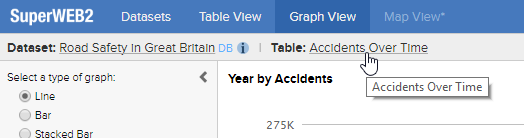
If you do not wish to show table names, then you can prevent this by setting the |
|
Version 9.9
Initial Release: April 2017
|
Product |
Area |
Description |
More Information |
|---|---|---|---|
|
Data Control API |
Functions |
The following new methods have been added to enable Data Control plugins to obtain additional weighting information: |
|
|
SuperADMIN |
Display Options |
For performance reasons, the Existing settings will be migrated automatically when SuperADMIN is upgraded, and no user action is required. The command used to set and check these settings remains the same, although as part of this change, display options settings can now be set for record counts (previously they could only be set for measures). |
|
|
SuperADMIN |
Max Attempts and Account Locking |
As a result of changes to the user catalogue (see below), there has been a minor change to the behaviour of the account locking feature. Previously, changing the global settings for In addition, it is now possible to configure individual groups or users whose accounts cannot be locked. |
|
|
SuperADMIN |
Port Usage |
As part of the implementation of user registration, SuperWEB2 communicates with SuperADMIN via a new REST API. If you want to deploy the user registration system then you must ensure that port 9001 is accessible. |
|
|
SuperADMIN |
User Catalogue and Data Storage |
For performance reasons, SuperADMIN now uses a relational database to store all user data (previously, it used an XML file). When you upgrade to version 9.9 SuperADMIN will automatically convert the existing user data to an H2 database. It is possible to switch to another RDBMS, although this change should only be made before going into production. Please contact STR for advice if you wish to change the RDBMS for a production system. SuperADMIN also uses H2 to store the configuration server data and data related to user registrations. Switching to another RDBMS will move all of this data in addition to the user data. |
|
|
SuperSERVER |
Audit Logging |
Some additional details are now recorded in the audit logs:
|
|
|
SuperSERVER |
Output Scaling and Precision |
The outputscaling data control module now supports:
As a result of this change, an additional column ( |
|
|
SuperWEB2 |
Direct URLs |
The direct URLs feature has been extended. Previously if you wanted to link directly to a dataset you could construct a link that opens that dataset in Table View ( In addition, a new URL parameter ( |
|
|
SuperWEB2 |
Graph View |
It is now possible to configure specific colours for specific fields to be used in Graph View. |
|
|
SuperWEB2 |
Guest Access |
A new configuration setting ( In addition, the username and password for guest access are now configured in the configuration.properties file, rather than web.xml. |
|
|
SuperWEB2 |
Large Table Mode |
The thresholds for large table mode are now configured in configuration.properties. Previously these settings were configured in CubeCatalog.xml. In addition, the default total cell threshold for large table mode has been increased from 10,000 to 100,000. |
|
|
SuperWEB2 |
Mandatory Fields |
Mandatory fields are now indicated in the field list by a small red * image that appears on top of the field icon and the field item icon. A new configuration option has been added that allows you to specify whether mandatory fields will be automatically tabulated when opening a dataset. |
|
|
SuperWEB2 |
Metadata |
The default metadata template supplied with SuperWEB2 has been renamed from sa-metadata.xhtml to metadata.xhtml. If you wish to continue using the default template you will need to update the settings in your configuration.properties file to match the new location (please also note that, as documented above, the path to this file changed from /webapi/help/ to /webapi/jsf/help/ in version 9.8). |
|
|
SuperWEB2 |
Preferences |
The Preferences page has been renamed to Account and now has additional options for users to change their password and delete their account. New settings have been added to the configuration.properties file that allow you to turn off these settings. |
|
|
SuperWEB2 |
Saved Tables and Datasets |
SuperWEB2 now displays a tool tip when you hover the mouse pointer over a saved table on the dataset catalogue page. This can be particularly useful if you have tables with very long names, as it is no longer necessary to use the horizontal scrollbar to see the full table name. |
|
|
SuperWEB2 |
Table Download as Open Data API Query |
A new download format has been added to the Download Table drop-down menu in Table View: you can now download the table as an Open Data API query. Selecting this option will download a text file containing JSON that you can pass in to the API in a table query. This feature is designed to make it easier to set up your API queries, as you can now use the SuperWEB2 drag and drop interface to design your queries and then easily reuse these in the application you are building with the API. Some table features are not supported by this download option. Learn more. |
|
|
SuperWEB2 |
User Registration |
SuperWEB2 now has an automated user registration system, designed to make it easy to allow users to sign up for an account on your SuperWEB2 deployment, set their own password, and change or reset their password. As part of this change, users can now change their password and delete their account from the Account page (accessible from the top-right menu). |
Version 9.8
Initial Release: November 2016
|
Product |
Area |
Description |
More Information |
|---|---|---|---|
|
SuperCROSS |
Excel Downloads |
Since version 9.0 SuperCROSS has been using a particular formatting function from a third-party library when generating Excel files. This function adjusts the row height in the downloaded Excel file to fit the text in the row. This function has been found to cause performance issues when downloading very large tables. SuperCROSS now runs the function only once per row when downloading very large tables, so in some cases it may be necessary to manually adjust the row height in the downloaded Excel file in order to see the full heading text. A new setting has been added to the super.ini configuration file: This setting controls the threshold for the new behaviour. Its value is the table cell count in millions. For example, when this is set to 90:
|
|
|
SuperWEB2 |
Derivations |
SuperWEB2 now allows users to create derivations within tables. Derivations are automatically enabled by default, but you can disable them globally by changing the As part of this change, a new property ( |
|
|
SuperWEB2 |
Duty of Care |
An issue has been resolved with the Duty of Care rule that prevented this feature from operating. The bug was originally introduced in version 9.0. In addition, the Duty of Care feature is now disabled by default. |
|
|
SuperWEB2 |
Excel Downloads |
It is now possible to control the formatting of annotations in Excel downloads. This is particularly useful if you have long annotations as you can now control how the text wraps beneath the table. In addition, the default Excel download templates have been updated to match the current default SuperWEB2 branding. |
|
|
SuperWEB2 |
Fields |
A new setting ( In previous releases, the list of fields was always fully collapsed when opening the dataset (so only the names of the top level folders would be visible initially). Now you can choose how many levels to expand. By default, all folders will now be expanded when you open a dataset. |
|
|
SuperWEB2 |
Graph View |
The configuration setting for specifying the PDF template for downloads from Graph View has changed. Previously this used a single setting ( This setting has been replaced by two individual settings in the configuration.properties file: |
|
|
SuperWEB2 |
Graph View |
It is now possible to configure the abbreviations used to shorten large numbers in the axes in Graph View. |
|
|
SuperWEB2 |
Info Pages |
The location of the HTML info pages (which are displayed on the right of the database catalogue screen) has changed. Previously these pages were located in <tomcat_home>\webapps\webapi\WEB-INF\resources\info\ Now, they are located in <tomcat_home>\webapps\webapi\info\ |
|
|
SuperWEB2 |
Metadata |
The files supplied for configuring metadata have been renamed from not-configured.jsp and sa-metadata.jsp to not-configured.xhtml and sa-metadata.xhtml. In addition, the default path to these files has changed from /webapi/help/ to /webapi/jsf/help/. You will need to update the settings in your configuration.properties file to match the new location. |
|
|
SuperWEB2 |
Tour |
A new interactive tour has been added to guide new users through the basic operations of SuperWEB2. |
|
|
SuperWEB2 |
User Interface |
A number of usability changes have been made to the SuperWEB2 user interface:
|
Version 9.7
Initial Release: June 2016
|
Product |
Area |
Description |
More Information |
|---|---|---|---|
|
SuperCROSS |
Grand Total |
Grand totals are now calculated using recode totals by default. This means that they now correctly handle non additive tables without double counting. Grand totals can also now be added to tables that have multiple summation options and return correct results for the total Relative Standard Error (RSE) as well as the RSE of percentages based on the grand total. If you wish to keep the behaviour from previous releases, set If you load a saved table, it will use the behaviour it was created with, until the grand total is switched off. As a result of this change, when using the new functionality if you select any of the total options from the Calculations menu your table results will be reset and you will need to run the cross tabulation again. If you have weighted databases and you are using the SuperSERVER weighting option, then you must use the new grand total behaviour. |
|
|
SuperCROSS |
Quantiles |
For weighted databases, it is now possible to display the Relative Standard Error of the range in the labels of quantile user defined fields. You can also choose to show the minimum and maximum RSE values in each label. |
|
|
SuperCROSS |
Quantiles (Precision) |
It is now possible to configure the precision used when displaying quantile range boundaries and RSE values in the labels of quantile user defined fields. The precision of these values is controlled by two new settings that you can add to the |
|
|
SuperCROSS |
Relative Standard Error |
When using weighted databases:
|
|
|
SuperCROSS |
Summation Options |
The statistics.xml file defines the statistical formulas used by SuperCROSS for its summation options.
As a result of changes to the statistics.xml file that is provided with SuperCROSS, the default set of functions available for some summation options has changed. In previous releases, the Define Recode window displayed a number of functions for counts, such as Mean and Standard Deviation, even though these are not meaningful calculations for a record count (for example, the mean of a record count will always be 1). Sum is now the only function available by default for counts. If you wish to revert to the previous behaviour, you can modify the statistics.xml file. |
|
|
SuperCROSS |
Weighting |
It is now possible to display both weighted and unweighted values in the same table when using SuperSERVER weightings in SuperCROSS. In previous versions, changing between a weighted and unweighted option in the Weight By drop-down list in the Define Recode window would change all of the functions in the Recode Values list to be either weighted or unweighted. Now, you can add a combination of weighted and unweighted functions to the Recode Values list. |
|
|
SuperSERVER |
Perturbation (Quantiles) |
Quantile perturbation requires three configuration files. In previous releases these had to be located in the same directory as the SXV4 file. New properties have been added to the data control modules so that it is now possible to configure the location of these files. |
|
|
SuperSERVER |
Relative Standard Error |
Prior to version 9.7, it was necessary to configure a data control plugin to calculate RSE values. From 9.7 onwards this now runs automatically for all SuperSERVER weighted databases, and will use the jackknife formula for calculating the RSE. You can still configure the plugin if you wish to change some of its other settings, such as the formula, thresholds and unreliable table message, although if you just want to change the formula used then you can do this by editing a setting in the weightings file (if both are configured then the plugin settings take precedence). As a result of this change, RSE values are now available for SuperSERVER weighted databases in SuperCROSS when confidentiality has been turned off using the padlock button. |
|
|
SuperSERVER |
Weighting |
New configuration options have been added to enable consistent weighting configuration across SuperCROSS and SuperWEB2. |
Version 9.6
Initial Release: April 2016
|
Product |
Area |
Description |
More Information |
|---|---|---|---|
|
Data Control |
Confidentiality Rule |
Additional configuration options have been added to the confidentiality rule data control module:
|
Version 9.5
Initial Release: November 2015
|
Product |
Area |
Description |
More Information |
|---|---|---|---|
|
Open Data API |
New Product |
The Open Data API is now available. This is an additional component that provides programmatic access to SuperSTAR data using a JSON REST API. |
|
|
SuperWEB2 |
Configuration |
The following settings have been added to the configuration.properties file:
|
|
|
SuperWEB2 |
Metadata |
A new file, metadataRedirect.html, is now supplied with SuperWEB2 to make it easier to configure static metadata. This file contains the code for redirecting to a static HTML page based on the dataset or field that the clicked metadata link relates to. |
|
|
SuperWEB2 |
User Interface |
A number of usability changes have been made to the SuperWEB2 user interface. Some on screen elements have moved or been renamed. For example:
If you have added your own UI languages, then some translation changes may be required. |
Version 9.3.2
Initial Release: September 2015
|
Product |
Area |
Description |
More Information |
|---|---|---|---|
|
SuperSERVER |
Perturbation |
New functionality has been added for propagating zero across fact tables when using perturbation. |
Version 9.3.0
Initial Release: July 2015
|
Product |
Area |
Description |
More Information |
|---|---|---|---|
|
SuperADMIN |
|
SuperADMIN now runs an embedded H2 server, listening on port 9092 but only on localhost. In a standard configuration, only the SuperADMIN server itself needs to access this port. This database is now used to store the data for the configuration server. In a new installation it will also be used to hold Field Level Security settings. |
|
|
SuperADMIN |
Field Level Security |
It is now much easier to allow or deny access to all values in a value set. Previously, each value had to be configured individually. |
|
|
SuperADMIN / SuperWEB2 |
Saved Tables |
This release adds the ability to load TXDs into the User Data Repository through SuperADMIN. This means you can save a TXD from SuperCROSS and then load it into the SuperADMIN catalogue so that SuperWEB2 users can access that table (in previous releases this required you to save the TXD file to a location within SuperWEB2 itself). Once you have loaded a TXD into the catalogue, you can use the |
|
|
SuperADMIN |
Server Command |
The |
|
|
SuperCHANNEL |
Perturbation |
From 9.3 onwards, SuperCHANNEL can automatically generate R Keys for perturbation. |
|
|
SuperCHANNEL |
TDD Driver Encoding |
A new option has been added to the config.txt configuration file allowing you to set the encoding to use when channelling with the TDD driver. You may need to change this setting if you are channelling data that contains characters that are not supported by the current system codepage. |
|
|
SuperCROSS |
Logging |
Additional logging is now available when SuperCROSS is running in server mode. SuperCROSS will now log the following events to the Super.logs.txt file (located in C:\ProgramData\STR\SuperCROSS\logs):
|
|
|
SuperCROSS |
Save Table Formats |
A new configuration option has been added to SuperModule.ini for configuring the order that the different download formats appear when saving tables. |
|
|
SuperSERVER |
Default Settings |
Some default settings have been changed for performance reasons: the default number of threads per cross tabulation is now 4 and the default number of processors is now 2. |
|
|
SuperSERVER |
Logging |
Some changes have been made to audit logging:
Some changes have been made to SuperSERVER and Metadata Server logging:
|
|
|
SuperWEB2 |
configuration.properties |
The following settings have been added to the configuration.properties file:
|
|
|
SuperWEB2 |
Default Table |
This release adds the ability to configure any table in the user data repository to be a default table. Previously, default tables could only be saved system tables (TXDs created in SuperCROSS and saved in the txd directory within SuperWEB2). |
|
|
SuperWEB2 |
Information Pages |
The information pages that are displayed on the dataset catalogue screen in SuperWEB2 now support more options:
|
|
|
SuperWEB2 |
Mapping |
Some settings in the basemaps.properties file have changed. This file that is used to configure the base map images (the map imagery itself, such as the street map images or the satellite view).
|
|
|
SuperWEB2 |
Mapping |
The plugin used to display Map View in SuperWEB2 has changed to ESRI leaflet. As a result of this change, the buttons that allow you to edit the table from within Map View have changed: the Freehand button is now Polygon, and works in a slightly different way. |
|
|
SuperWEB2 |
Metadata |
A number of new features have been added to metadata:
|
|
|
SuperWEB2 |
Precision |
In some cases, precision settings in TXDs now override the SuperWEB2 precision settings. In previous releases, the summation options precision setting (defined using the |
|
|
SuperWEB2 |
Select All At Level Drop-Down |
It is now possible to display the label of the first item in a valueset in the Select all at level drop-down. This new setting makes SuperWEB2 more closely match the behaviour of SuperCROSS, which displays the first item in a valueset when displaying hierarchies in the Define Recode window. |
|
|
SuperWEB2 |
Sorting |
A new configuration option has been added that allows you to prevent users from sorting a field alphabetically in SuperWEB2. By default, when a field has been added to the table rows, SuperWEB2 allows users to sort it into ascending and descending alphabetical order. In some cases, this will not make sense (for example, a date field where it does not make sense to sort the months alphabetically). |
Version 9.2.7
Initial Release: May 2015
|
Product |
Area |
Description |
More Information |
|---|---|---|---|
|
SuperWEB2 |
Mapping |
A new property has been added to the mapping configuration: This property sets the host name of the Tomcat instance that mapping will use when it needs to make a request to another of the REST endpoints. |
Version 9.2.6
Initial Release: April 2015
|
Product |
Area |
Description |
More Information |
|---|---|---|---|
|
SuperWEB2 |
configuration.properties |
The following settings have been added to the configuration.properties file:
|
|
|
SuperWEB2 |
Mapping |
It is now possible to change the directory that is used to store mapping cache files. |
|
|
SuperWEB2 |
Precision |
It is now possible to disable number formatting in downloads, which can improve the performance when downloading large tables. |
|
|
SuperWEB2 |
Table Downloads |
SuperWEB2 can now be configured to add a warning/disclaimer when tables are printed. |
|
|
SuperWEB2 |
Terms and Conditions |
SuperWEB2 can now display a terms and conditions screen during log in. |
Version 9.2.2
Initial Release: February 2015
|
Product |
Area |
Description |
More Information |
|---|---|---|---|
|
SuperWEB2 |
configuration.properties |
The following setting has been added to the configuration.properties file:
|
Version 9.2.1
Initial Release: January 2015
|
Product |
Area |
Description |
More Information |
|---|---|---|---|
|
SuperWEB2 |
configuration.properties |
The following settings have been added to the configuration.properties file:
|
Version 9.2
Initial Release: January 2015
|
Product |
Area |
Description |
More Information |
|---|---|---|---|
|
SuperCROSS |
Fact Table Relationships |
It is now possible to see a visualisation of the relationship between fact tables in the SXV4. This is particularly useful if you have a complex dataset that has lots of interconnected fact tables. |
|
|
SuperWEB2 |
configuration.properties |
The following setting has been added to the configuration.properties file:
|
|
|
SuperWEB2 |
Graph View |
The cell limit for accessing graph view can now be modified. Previously, this limit was fixed at 1,000 visible table cells. |
|
|
SuperWEB2 |
Metadata |
SuperWEB2 now uses the metadata server when connecting to a metadata database. Prior to this release, SuperWEB2 connected to the external database directly. |
Version 9.1
Initial Release: December 2014
|
Product |
Area |
Description |
More Information |
|---|---|---|---|
|
SuperCHANNEL |
Totals |
The Totals Appropriate setting has been added to SuperCHANNEL. This allows you to disallow totals for specific classification tables. It currently applies to SuperWEB2 only. |
|
|
SuperWEB2 |
User Defined Fields |
This release adds the ability to import user defined fields from SuperCROSS into SuperWEB2. |
Version 9.0
Initial Release: October 2014
|
Product |
Area |
Description |
More Information |
|---|---|---|---|
|
All |
Unicode |
SuperSTAR now features full Unicode support. In some cases you may need to update existing SXV4s, TXDs and macros to ensure they work with version 9.0 and above, although in the vast majority of cases this change will be completely transparent and no action will be required. |
|
|
Data Control |
Record Count and Perturbation |
A new Record Count data control module has been added. In addition, the perturbation module now has the ability to perturb other results. |
|
|
Data Control API |
Functions |
A new function ( |
|
|
Java |
|
Java 7 or later is now required. Java is included with the SuperSTAR installation. |
|
|
SuperADMIN / SuperWEB2 |
Configuration Server |
This release introduces the configuration server. This is a JSON configuration system that stores a number of internal settings. Most of these settings are used by SuperWEB2, and were previously configured in XML and .properties files within SuperWEB2 itself. These settings can now be set and checked using the If you are upgrading from an earlier release you will need to check the list of settings that have moved to the configuration server and manually reapply any that are required for your deployment. The configuration server communicates on port 9000, so you will need to ensure your network firewalls are properly configured to allow this communication: this port must be accessible by SuperWEB2 and any machines running the SuperADMIN console. We recommend you do not make port 9000 publicly accessible, even if your SuperWEB2 server is publicly accessible. |
|
|
SuperCHANNEL |
Batch Mode |
SuperCHANNEL batch mode now supports the skip and stop cleansing rules, as well as null columns. |
|
|
SuperCROSS |
ColourMatrix |
The ColourVIEW feature has been replaced with ColourMatrix. |
|
|
SuperSERVER |
Update Dataset |
SuperSERVER now supports live updates of compatible SXV4s. As long as there have been no changes to the SXV4 schema, you can live swap to a new SXV4 with no downtime. |
|
|
SuperWEB2 |
Bulk Selection |
A new feature has been added for cases where a field has a large number of valueset items. SuperWEB2 now displays a bulk selection option allowing users to search for and select the items they want. |
|
|
SuperWEB2 |
Catalogue |
It is now possible to choose the sort order for the dataset catalogue.e |
|
|
SuperWEB2 |
Configuration |
A new SuperWEB2 configuration file, configuration.properties, has been added, and many settings have moved to this file. When upgrading from an earlier release you will need to manually reapply any required settings by editing the new configuration.properties file. |
|
|
SuperWEB2 |
Default Table |
It is now possible to configure a default table for each of your datasets. |
|
|
SuperWEB2 |
Drag and Drop |
Users can now build tables quickly by dragging and dropping fields. |
|
|
SuperWEB2 |
Graph View |
Graph view has been completely updated with new look interactive graphs. |
|
|
SuperWEB2 |
Hierarchies |
It is now possible to navigate up and down the levels of a hierarchical field from with the table. In addition, the default settings have been changed so that it is now possible to mix items from different levels of a hierarchy within a table (for example adding both Victoria and Melbourne from an Area hierarchy to the table at the same time). In previous releases, this behaviour was disabled by default. You can revert to the previous behaviour by editing the rules in the RulesEngine.xml configuration file. |
|
|
SuperWEB2 |
Mandatory Fields |
Mandatory fields are now defined on a per-dataset basis only. Previously it was possible to define global mandatory fields. |
|
|
SuperWEB2 |
Mapping |
SuperWEB2 mapping configuration has been moved from an XML file to the configuration server. |
|
|
SuperWEB2 |
Multilingual Support |
SuperWEB2 now supports multilingual datasets. In addition, users can select their preferred user interface language from the SuperWEB2 menu. Prior to this release, SuperWEB2 automatically set the user interface language based on the user's browser settings. |
|
|
SuperWEB2 |
Ranges and Quantiles |
The range and quantile options now support translations based on the current dataset language. |
|
|
SuperWEB2 |
Zero Suppression |
SuperWEB2 now supports zero suppression. |