
Cleansing actions allow you to clean up some of your source data when building your SXV4 database. Cleansing actions only apply to fields that are supposed to be one of a set of possible values; they control what SuperCHANNEL should do when it encounters a value that does not match one of the current list of possible values.
Use the BINS registry table to specify that a column in your source database should use the "bin" cleansing action. With this action, if SuperCHANNEL encounters a value that does not match one of the possible options, it will automatically convert ("bin") that value to a value that you have specified.
It is also possible to specify cleansing actions in the CLEANSING_RULES registry table. If a column appears in both tables, then whatever is set in the BINS table takes precedence over the CLEANSING_RULES table.
Table Definition
|
Column Name |
Data Type |
Size |
Primary Key |
Specifies... |
|---|---|---|---|---|
|
TABLENAME |
string |
128 |
YES |
The name of the table that the bin cleansing action applies to. |
|
COLUMNNAME |
string |
128 |
YES |
The column name (in the specified table) that the bin cleansing action applies to. This column must be a foreign key from a fact table to a classification or fact table that defines the possible values. If this is not the case the rule will be ignored. |
|
BINVALUE |
string |
128 |
YES |
The value to convert to, if the current value does not match any of the possible values. You can only have one "bin" value for any given column. |
Example
For example, if the BINS registry table contains the following entries:
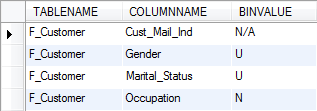
Then:
-
Any value in the Cust_Mail_Ind column in the F_Customer table that does not match one of its possible values will automatically be converted to N/A
-
Any value in the Gender column in the F_Customer table that does not match one of its possible values will automatically be converted to U
-
Any value in the Marital_Status column in the F_Customer table that does not match one of its possible values will automatically be converted to U
-
Any value in the Occupation column in the F_Customer table that does not match one of its possible values will automatically be converted to N